前言
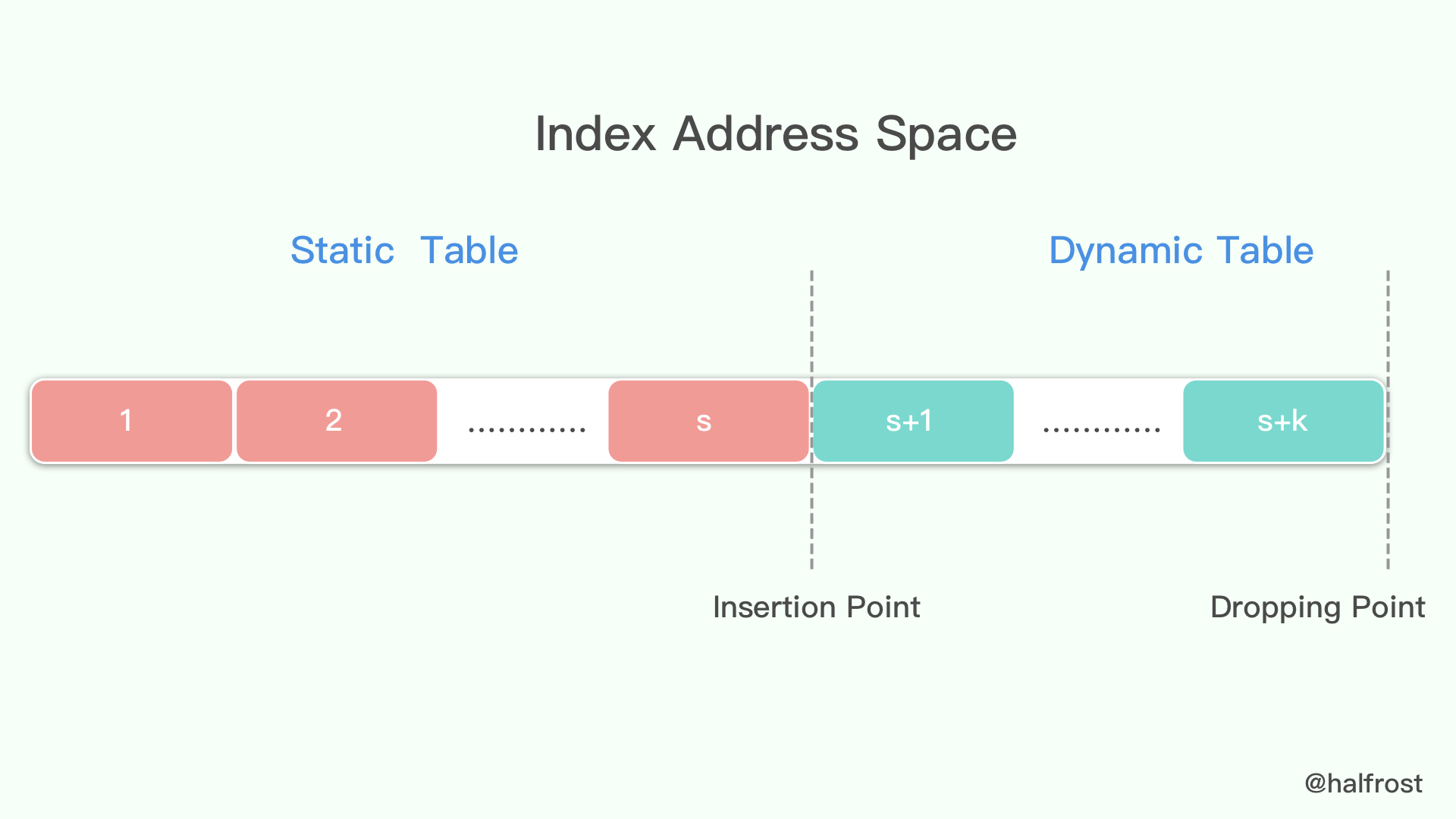
在这里将结合netty的io.netty.handler.codec.http2.HpackDecoder#decode(io.netty.buffer.ByteBuf, io.netty.handler.codec.http2.HpackDecoder.Http2HeadersSink)方法理解,http2 header头部压缩,使用hpack算法,简单来讲就是使用静态表和动态表对头部进行索引
- 静态表:静态表就是http2事先约定好的一些常用的头部,比如”:status”, “404”、”accept-encoding”, “gzip, deflate”等。
- 动态表:而动态表就是在传递数据时,连接双方通过协议约定,将静态表中没有的头部添加到动态表中。动态表的索引值是排在静态表之后的,也就是说动态表的第一个索引值,是静态表最大索引值加一,这样就可以直接传递索引值,而不需要表明时静态表还是动态表。动态表是连接相关联的,也就是说一个服务端口,每有一个http2连接,就有一个动态表,所以同样的两个服务之间,建立的http2连接越少越好,动态表的利用率就越高,动态表的初始大小可以在Setting帧中设置SETTINGS_HEADER_TABLE_SIZE来控制

传递数据的形式
http2 header可以传送两种数据,分别是int,和string,也就是数值和字符串
数值
如果需要传递某一个的http2 header在静态表或者动态表中存在,那么对于该http2 header只需要传递一个索引值即可
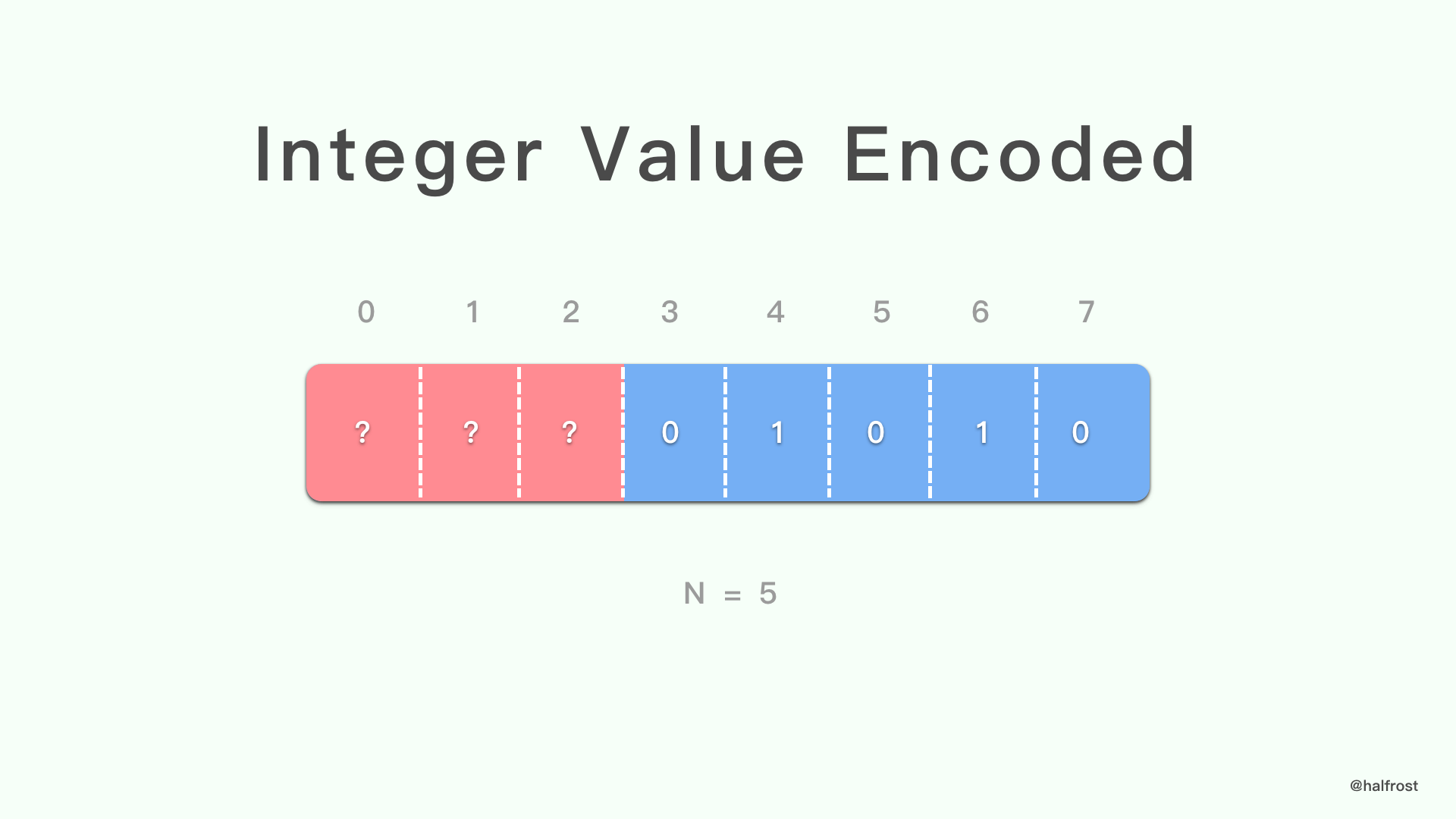
传递的数据由若干个字节组成,一字节有八位,http2 header中每个八位字节可以单独起作用,在表示数值形式时,如果只表示正数的话,一个八位字节可以表示0-255,当然http2 header的八位字节不能八位全部作为数据,在八位字节需要启到不同的作用时,八位中会有不同的高位需要作为标识,而其他的低位作为数据,我们用N代表可以作为数据的位数,至于是哪些情况,N又是多少,下面会详细讲到,比如数值作为索引,数值作为name数据长度等。示例如下图,三个高位作为标识,而五位低位作为数据,即N为5
这种模式就会存在两个情况
- 八位字节中作为数据的位数足够表示我们需要传递的数值,比如当我们需要传递数值50的时候,而N为5的情况下,能够表示的最大数值为63,那么就足够表示数值50
- 八位字节中作为数据的位数不足够表示我们需要传递的数值,比如当我们需要传递数值200的时候,而N为5的情况下就不足够表示200,那么这种情况下,就将当前八位字节的数据位全部置为1,表示先当前八位字节能表示的最大值,我们要传递的数值减去该字节最大值剩余的值在后面加入几位进行编码
- 后续字节的编码规则为,将需要编码的数值用二进制表示,并且将二进制以七位为一组进行分割,从右往左依次放入到后续字节中,是七位而不是八位是因为字节的最高位需要作为标识,判断当前编码是否结束,最后的字节的最高位置为0,表示编码结束,前面字节的最高位置为1。
- 比如值为200,而N为5的情况下,当前字节数据位全部置为1,表示63,而200-63=137,137则在后面添加几个字节进行编码,137的二进制表示为10001001,以七位分割得到1,0001001,按照从右往左依次添加,并且最后一个字节最高位置为0,其余字节最高位置为1的规则,那么后续就需要两个字节,分别为10001001、00000001,我们传递数值200完整的三个字节为???11111、10001001、00000001
下面是netty对数值进行编码的代码实现
1
2
3
4
5
6
7
8
9
10
11
12
13
14
15
16
17
18
| private static void encodeInteger(ByteBuf out, int mask, int n, long i) {
assert n >= 0 && n <= 8 : "N: " + n;
int nbits = 255 >>> 8 - n;
if (i < (long)nbits) {
out.writeByte((int)((long)mask | i));
} else {
out.writeByte(mask | nbits);
long length;
for(length = i - (long)nbits; (length & -128L) != 0L; length >>>= 7) {
out.writeByte((int)(length & 127L | 128L));
}
out.writeByte((int)length);
}
}
|
字符串
如果某个http2 header不在静态表或者动态表中,那么就会存在一下几种情况
- 对该header的value没有索引,但是对该header的name有索引,那么只有value涉及到字符串编码
- 对该header的value和name都没有索引,那么name和value都需要涉及到字符串编码
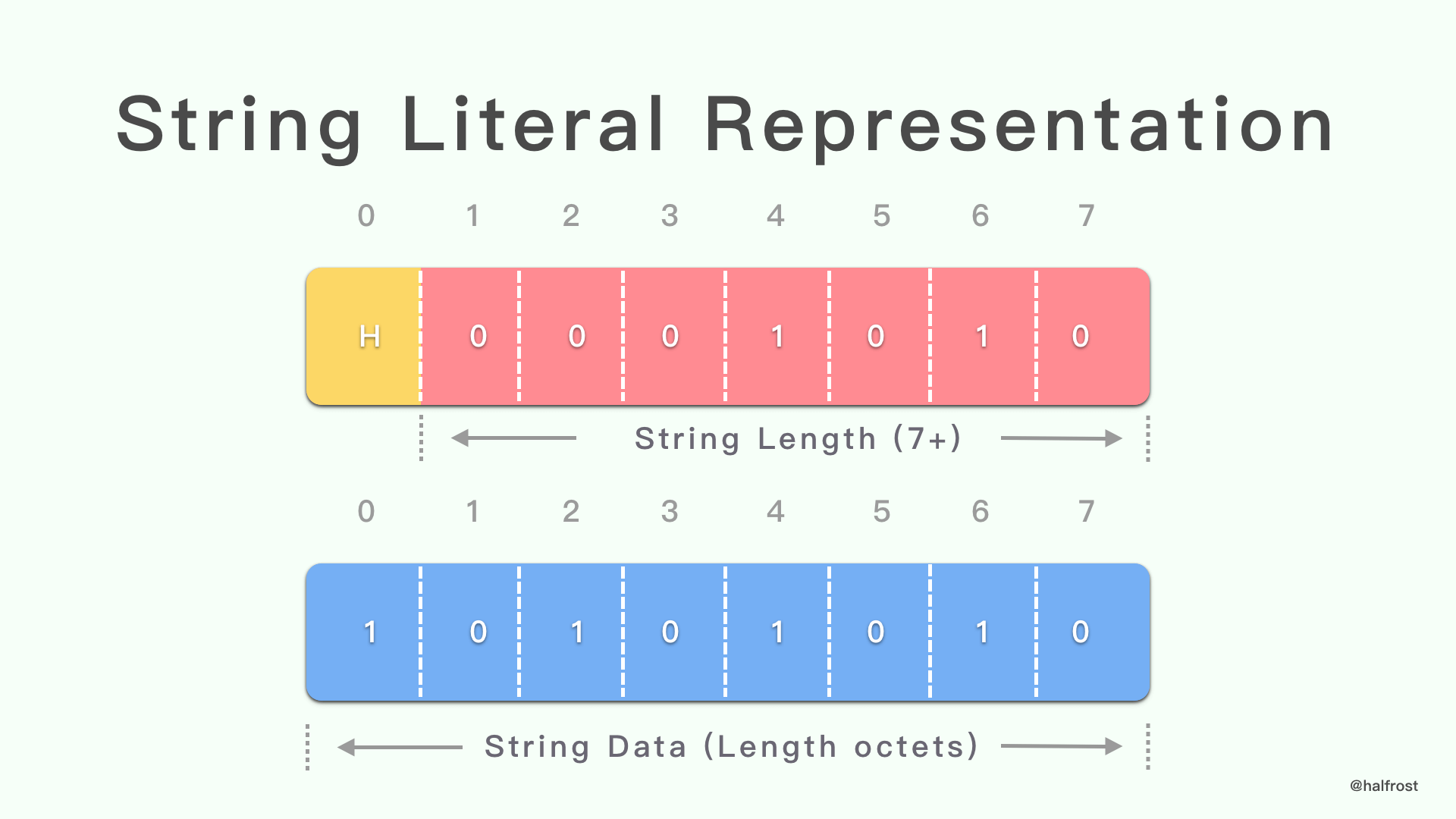
字符串的编码由两部分组成,第一部分是数值,是字符串长度的数值编码,可以让解码器知道后面的数据中有多少是当前字符串,在这里的数值编码N为7,因为最高位需要标识字符串编码是否使用到了霍夫曼编码,最高位为1标识使用了霍夫曼编码,最高位为0反之,第二部分就是字符串的编码
hpack算法对字符串编码,有两种编码方式,一种是直接编码,即将字符串转为字节数组,另一种是通过霍夫曼编码,使用霍夫曼的前提,字符串的长度大于设定的阈值并且使用霍夫曼编码后的数据小于正常编码
上图就是一个字符串编码的示例,H就是代表是否采用霍夫曼编码,当然实际情况中,字符串部分几乎不可能是一个字节
下面是netty实现的字符串编码
1
2
3
4
5
6
7
8
9
10
11
12
13
14
15
16
17
18
19
20
21
22
| private void encodeLiteral(ByteBuf out, CharSequence name, CharSequence value, HpackUtil.IndexType indexType, int nameIndex) {
boolean nameIndexValid = nameIndex != -1;
switch (indexType) {
case INCREMENTAL:
encodeInteger(out, 64, 6, nameIndexValid ? nameIndex : 0);
break;
case NONE:
encodeInteger(out, 0, 4, nameIndexValid ? nameIndex : 0);
break;
case NEVER:
encodeInteger(out, 16, 4, nameIndexValid ? nameIndex : 0);
break;
default:
throw new Error("should not reach here");
}
if (!nameIndexValid) {
this.encodeStringLiteral(out, name);
}
this.encodeStringLiteral(out, value);
}
|
1
2
3
4
5
6
7
8
9
10
11
12
13
14
15
16
| private void encodeStringLiteral(ByteBuf out, CharSequence string) {
int huffmanLength;
if (string.length() >= this.huffCodeThreshold && (huffmanLength = this.hpackHuffmanEncoder.getEncodedLength(string)) < string.length()) {
encodeInteger(out, 128, 7, huffmanLength);
this.hpackHuffmanEncoder.encode(out, string);
} else {
encodeInteger(out, 0, 7, string.length());
if (string instanceof AsciiString) {
AsciiString asciiString = (AsciiString)string;
out.writeBytes(asciiString.array(), asciiString.arrayOffset(), asciiString.length());
} else {
out.writeCharSequence(string, CharsetUtil.ISO_8859_1);
}
}
}
|
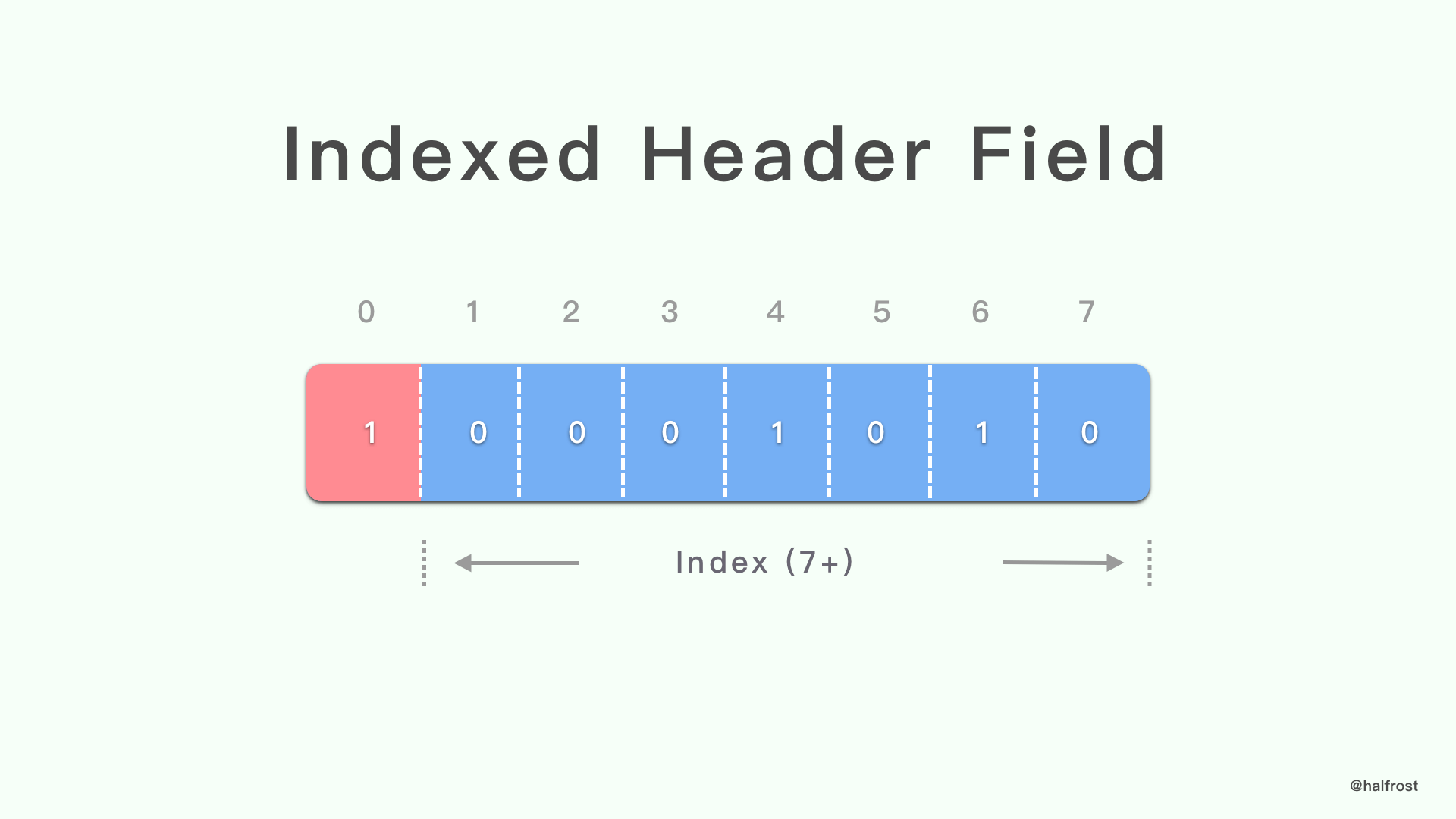
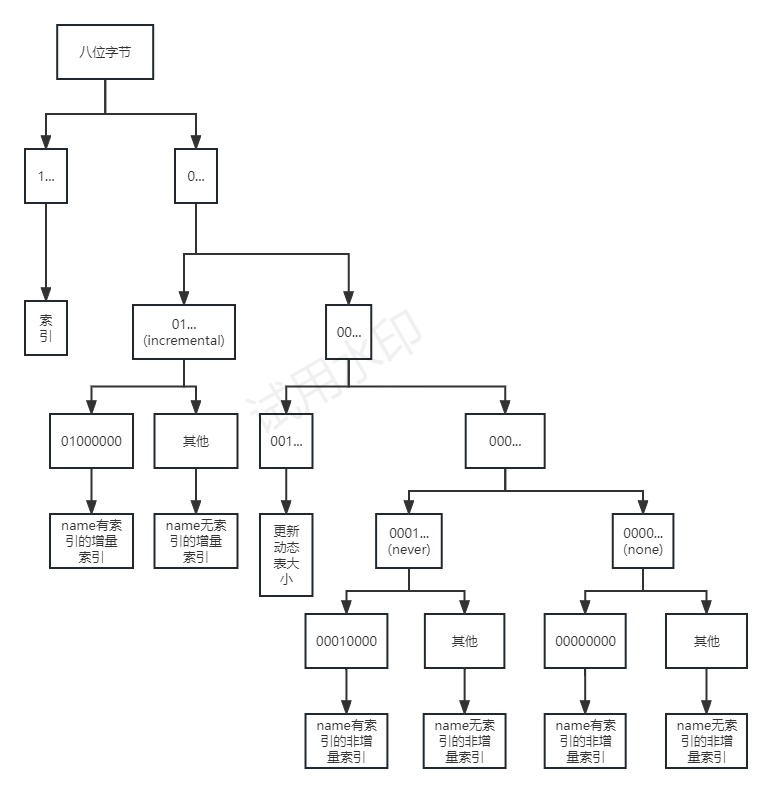
当header的name和value都有索引的情况下,只需要传递一个数值即可,这种情况数值编码的N为7,并且最高位位1
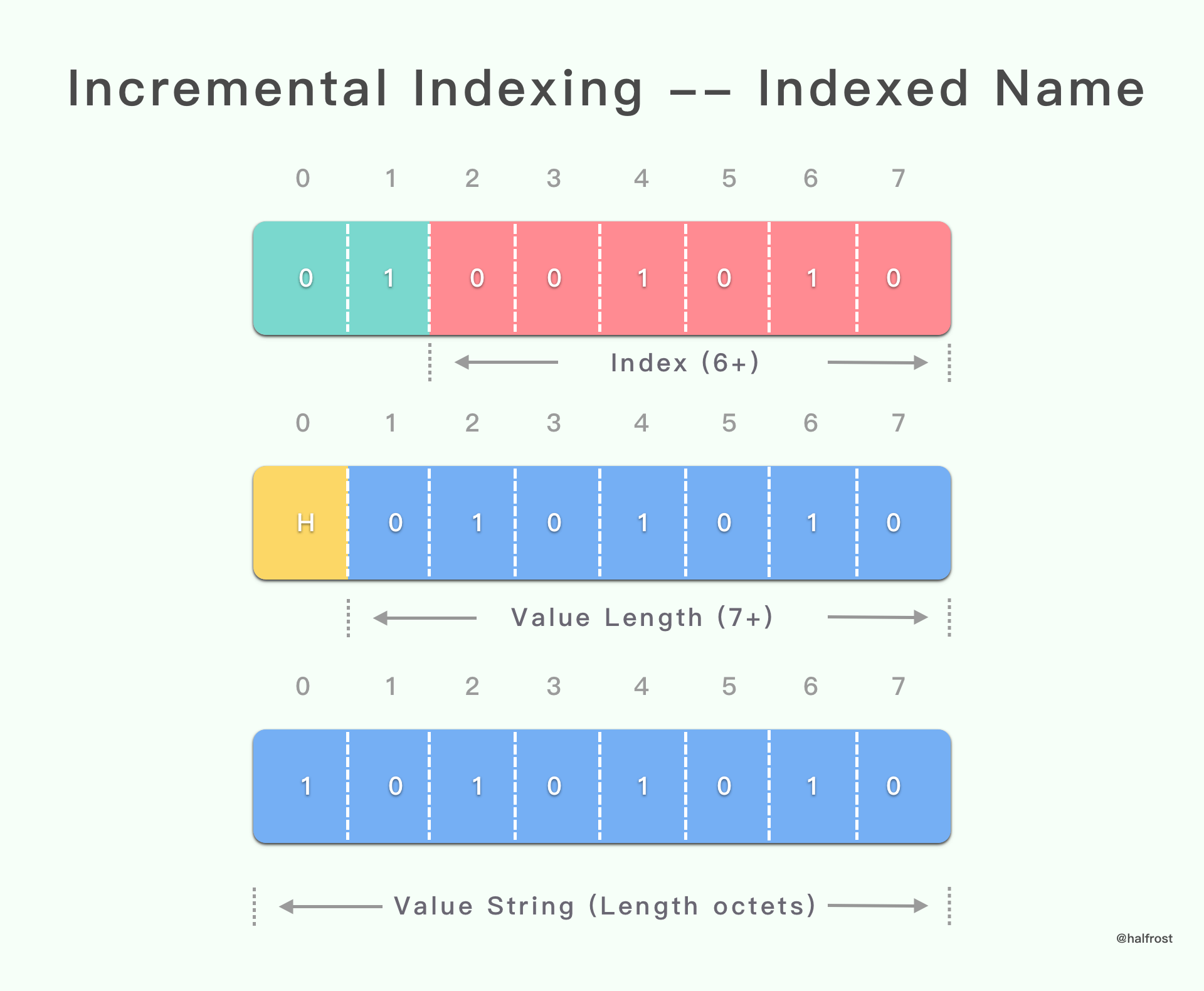
在header name有索引的情况下,那么name就由索引值代替,即直接用数值编码,而value则使用字符串编码,由于是增量的,需要标明该header需要添加到动态表,这种情况下name的数值编码的N为6,最高的两位为01
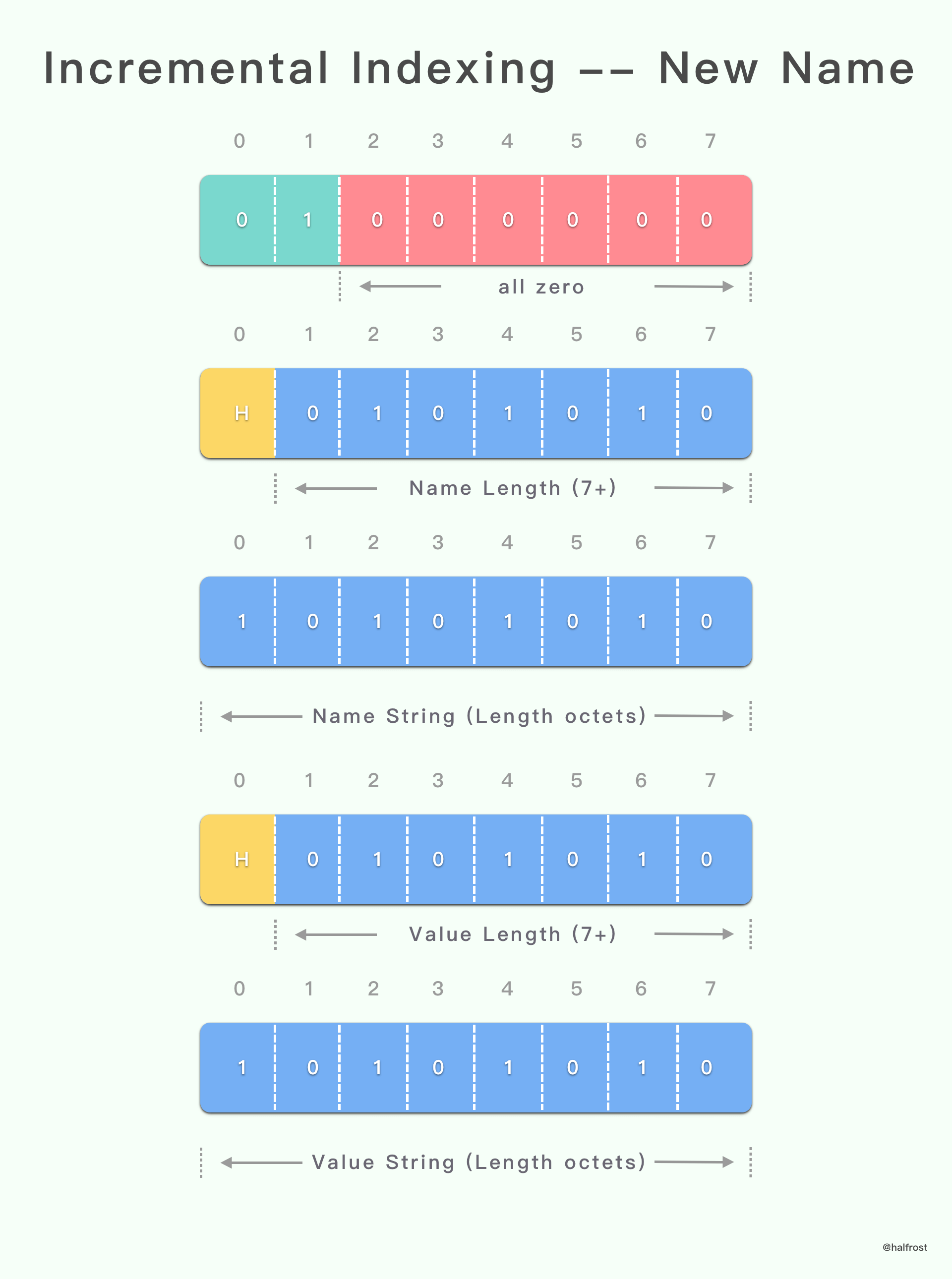
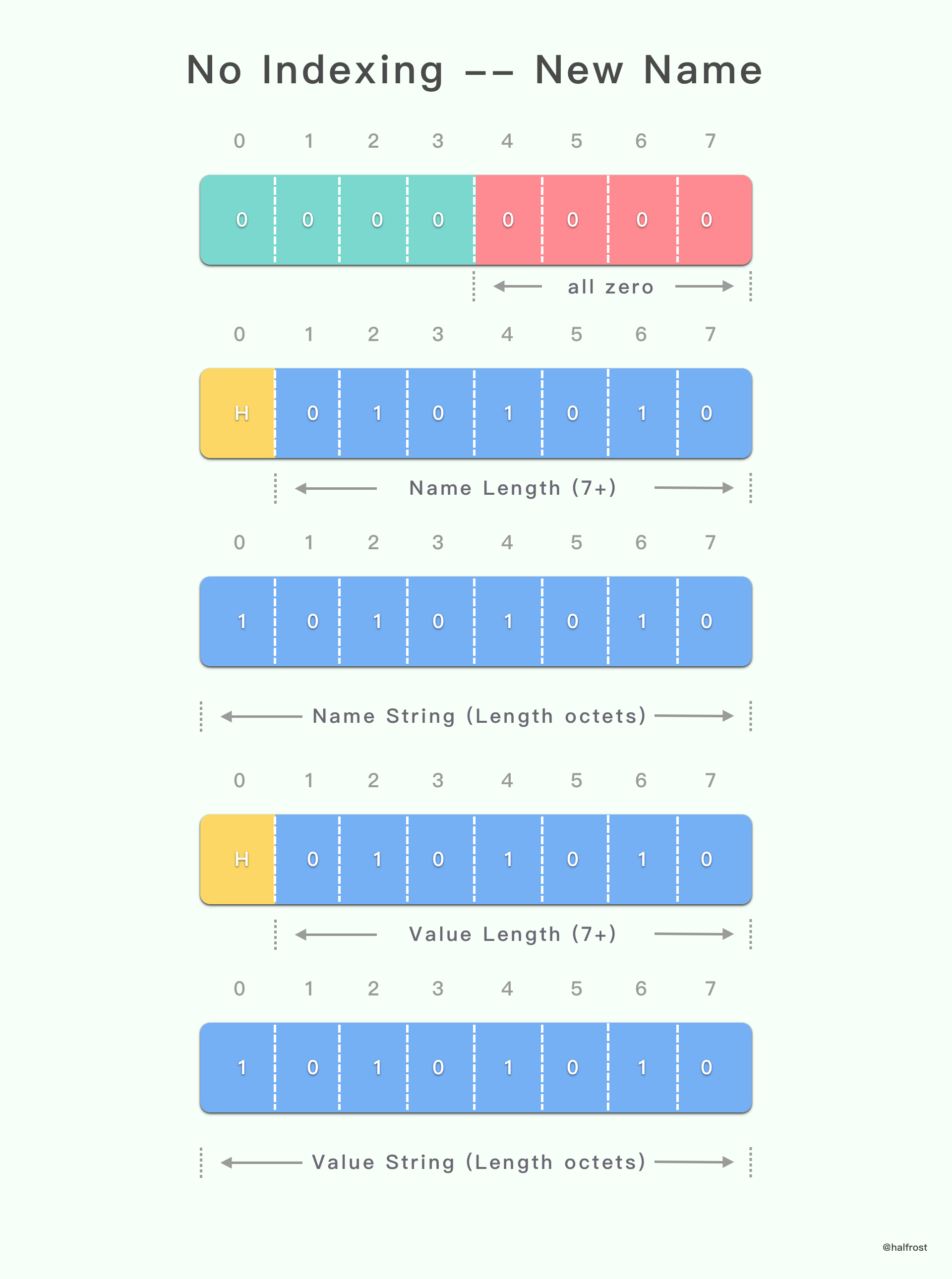
在header name无索引的情况下,比如自己自定义了一个header,那么name和value都需要使用字符串编码,由于是增量的,需要标明该header需要添加到动态表,这种情况下该header的第一个字节用于标识,和name有索引的情况一样,字节的最高两位为01,但是后6位为全为0,这个字节后面跟上name和value的字符串编码
非增量索引有两个状态,none和never,这两个状态都不会将索引添加到动态表
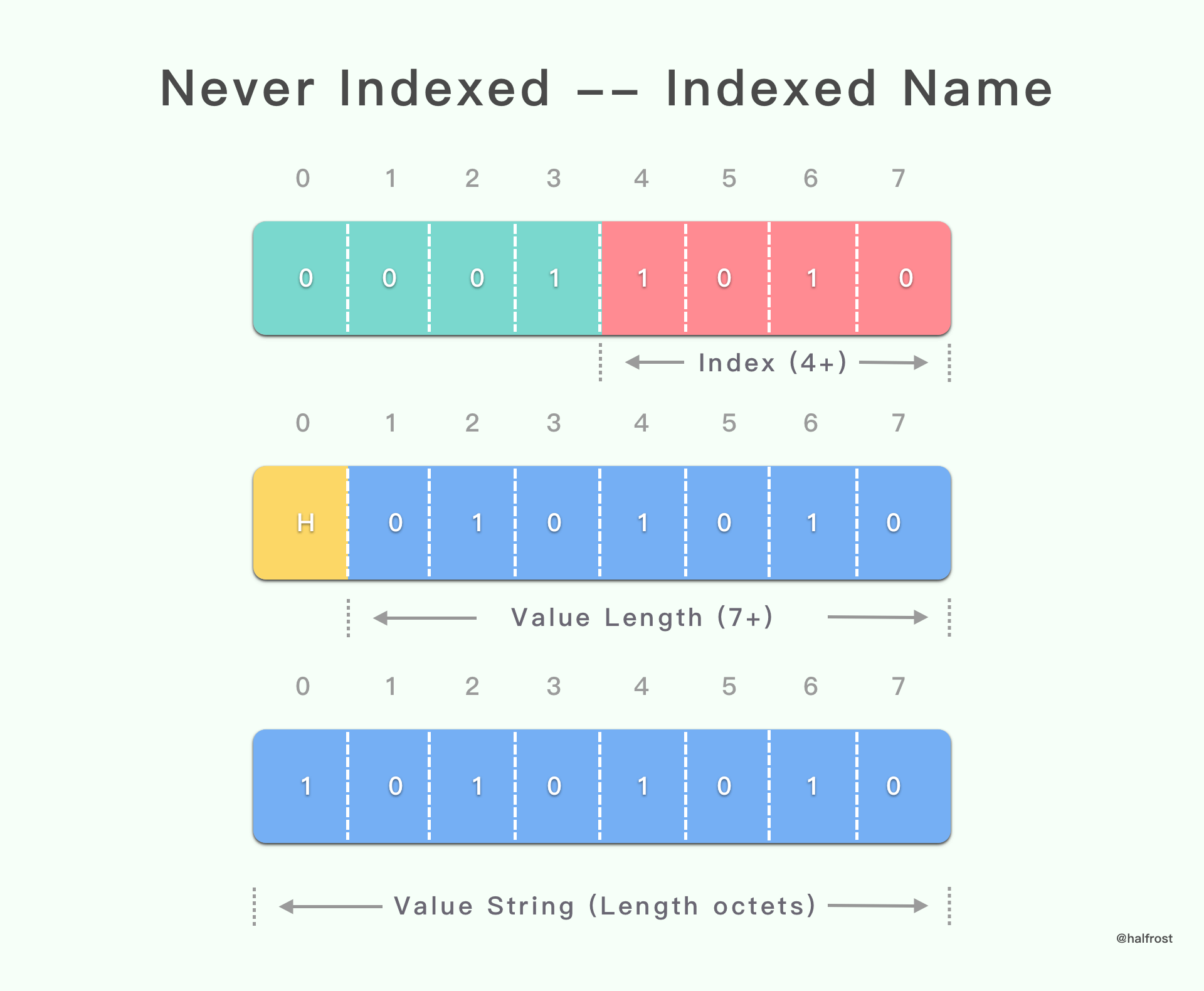
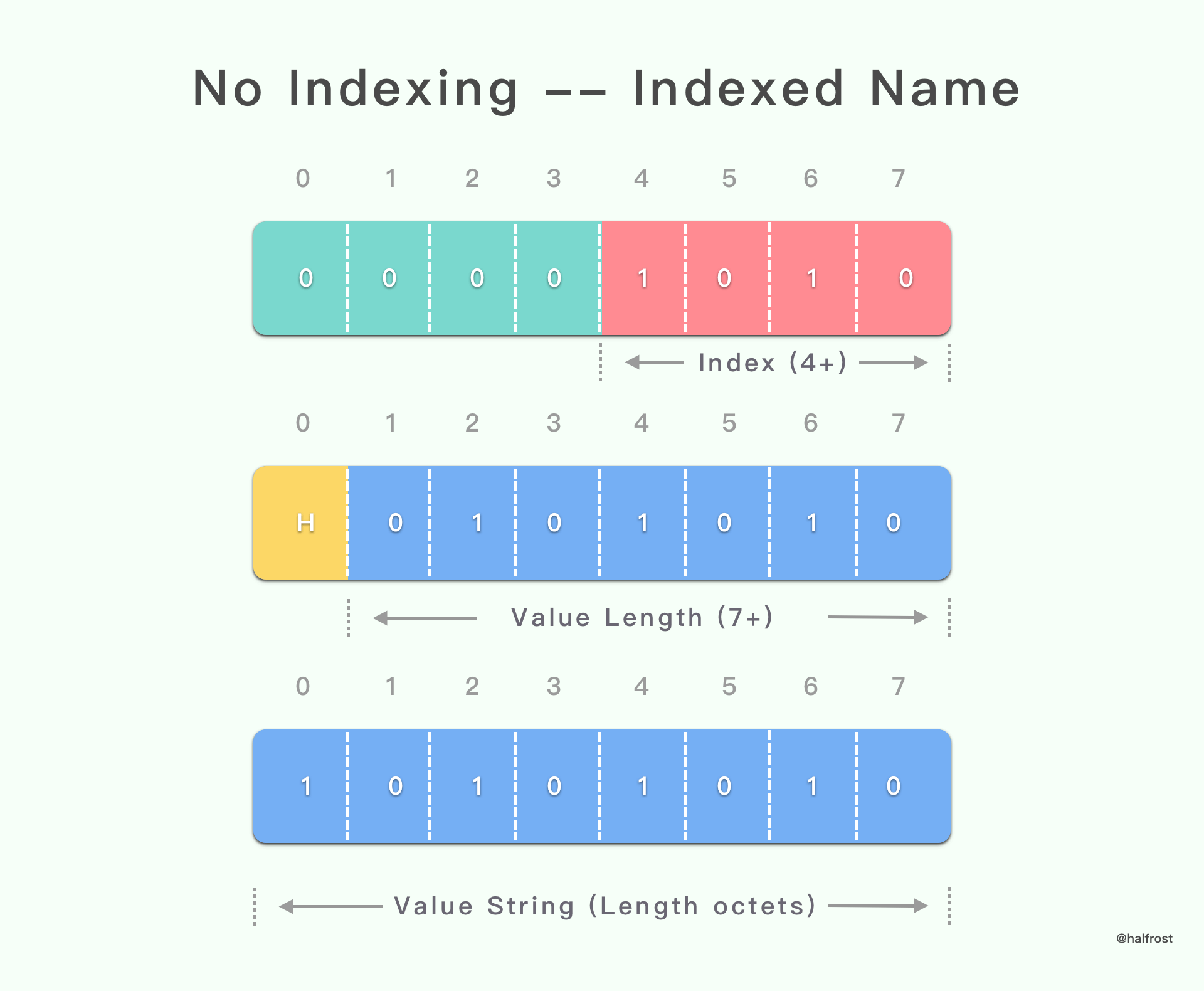
在header name有索引的情况下,那么name就由索引值代替,即直接用数值编码,而value则使用字符串编码,由于是非增量的,表明该header不添加到动态表,这种情况下name的数值编码的N为4,最高的四位为0000(none)和0001(never)
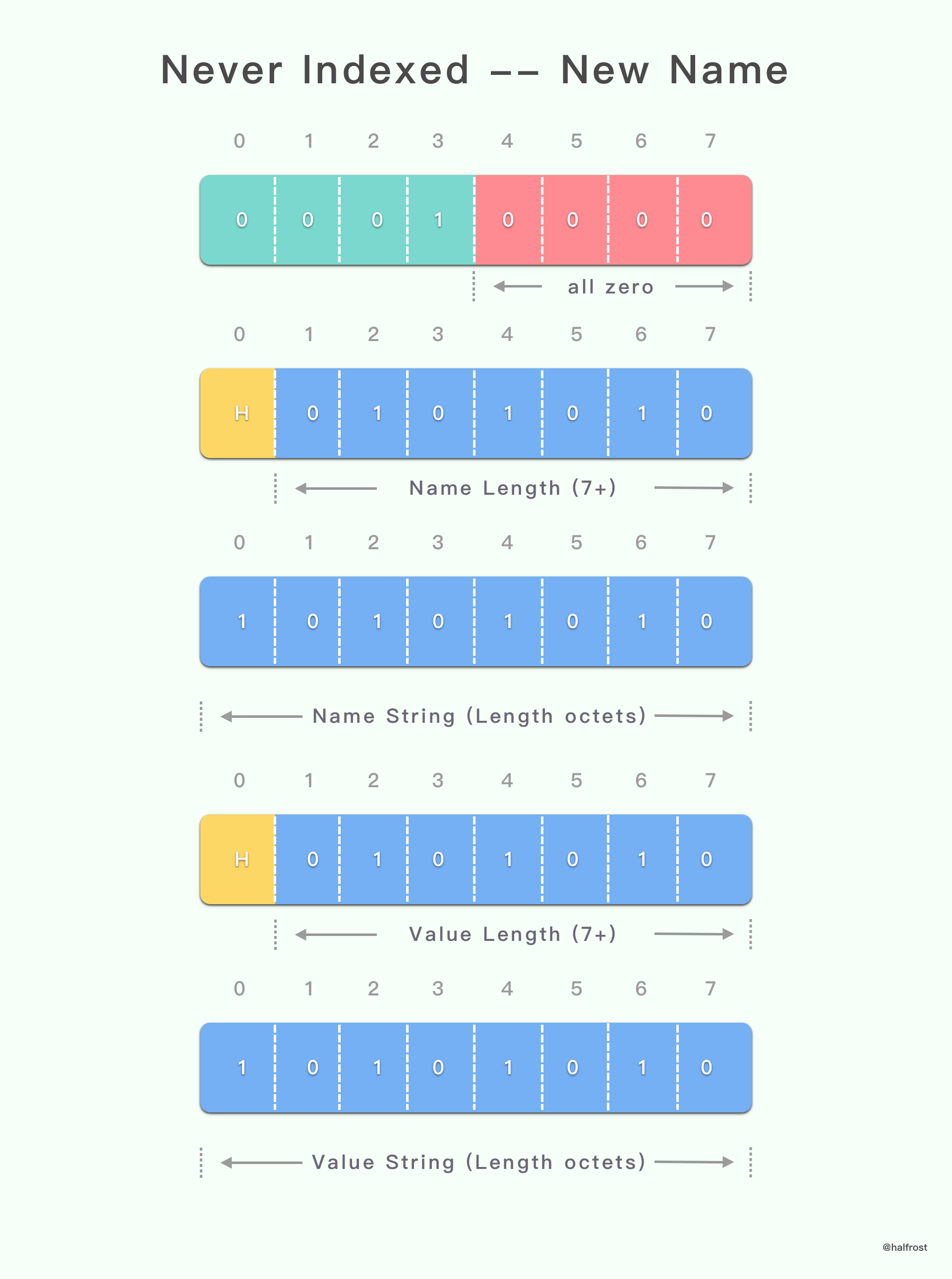
在header name无索引的情况下,比如自己自定义了一个header,那么name和value都需要使用字符串编码,由于是非增量的,表明该header不添加到动态表,这种情况下该header的第一个字节用于标识,和name有索引的情况一样,字节的最高的四位为0000(none)和0001(never),但是后4位为全为0,这个字节后面跟上name和value的字符串编码
更新动态表大小
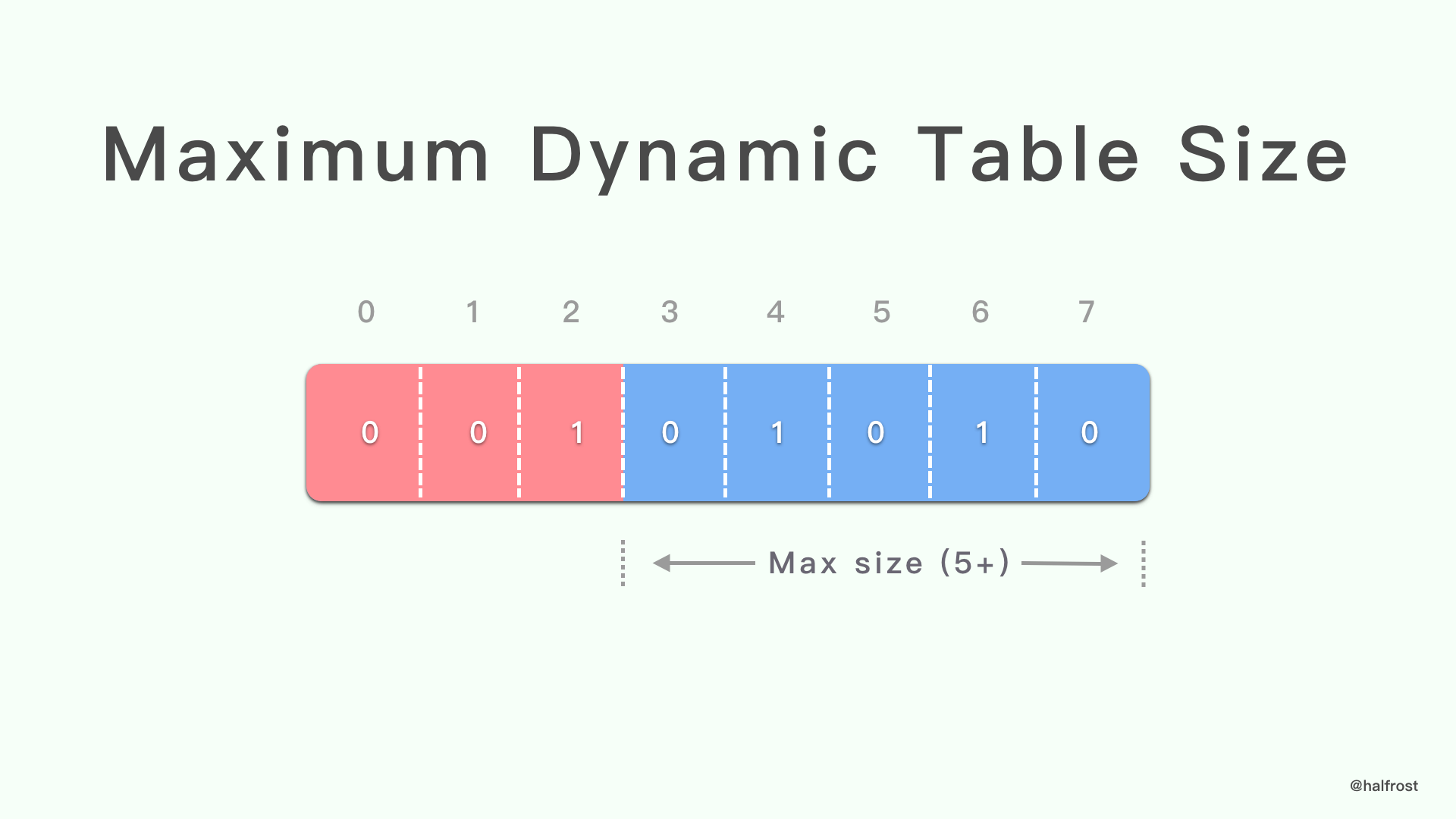
除了在Setting 帧中设置SETTINGS_HEADER_TABLE_SIZE,http2 header还可以通过传递一个数值通知更新动态表大小,这个数值的N为7,最高的三位为001,用于标识该数值用于更新动态表表大小
图解
下面是不同情况的简单图解,图中所有情况对应的数值编码的N为除最高几位标识符以外的位数,基本文字介绍
- 索引:指http2 header的name和value有完整的索引
- name有索引的增量索引:指http2 header的name有索引,但是value没有索引,会将该header添加到动态表
- name无索引的增量索引:指http2 header的name无索引,并且value没有索引,会将该header添加到动态表
- name有索引的非增量索引:指http2 header的name有索引,但是value没有索引,不将该header添加到动态表
- name无索引的非增量索引:指http2 header的name无索引,并且value没有索引,不将该header添加到动态表
- incremental:http2 header的索引类型,代表增量索引
- none:http2 header的索引类型,代表无索引
- never:http2 header的索引类型,代表不使用索引
netty头部压缩相关方法
可以结合以下netty实现的http2 header头部压缩解码方法理解
1
2
3
4
5
6
7
8
9
10
11
12
13
14
15
16
17
18
19
20
21
22
23
24
25
26
27
28
29
30
31
32
33
34
35
36
37
38
39
40
41
42
43
44
45
46
47
48
49
50
51
52
53
54
55
56
57
58
59
60
61
62
63
64
65
66
67
68
69
70
71
72
73
74
75
76
77
78
79
80
81
82
83
84
85
86
87
88
89
90
91
92
93
94
95
96
97
98
99
100
101
102
103
104
105
106
107
108
109
110
111
112
113
114
115
116
117
118
119
120
121
122
123
124
125
126
127
128
129
130
131
132
133
134
135
136
137
138
139
| private void decode(ByteBuf in, Http2HeadersSink sink) throws Http2Exception {
int index = 0;
int nameLength = 0;
int valueLength = 0;
byte state = 0;
boolean huffmanEncoded = false;
AsciiString name = null;
HpackUtil.IndexType indexType = IndexType.NONE;
while(in.isReadable()) {
byte b;
HpackHeaderField indexedHeader;
switch (state) {
case 0:
b = in.readByte();
if (this.maxDynamicTableSizeChangeRequired && (b & 224) != 32) {
throw MAX_DYNAMIC_TABLE_SIZE_CHANGE_REQUIRED;
}
if (b < 0) {
index = b & 127;
switch (index) {
case 0:
throw DECODE_ILLEGAL_INDEX_VALUE;
case 127:
state = 1;
continue;
default:
indexedHeader = this.getIndexedHeader(index);
sink.appendToHeaderList((AsciiString)indexedHeader.name, (AsciiString)indexedHeader.value);
}
} else if ((b & 64) == 64) {
indexType = IndexType.INCREMENTAL;
index = b & 63;
switch (index) {
case 0:
state = 3;
continue;
case 63:
state = 2;
continue;
default:
name = this.readName(index);
nameLength = name.length();
state = 6;
}
} else {
if ((b & 32) == 32) {
throw Http2Exception.connectionError(Http2Error.COMPRESSION_ERROR, "Dynamic table size update must happen at the beginning of the header block", new Object[0]);
}
indexType = (b & 16) == 16 ? IndexType.NEVER : IndexType.NONE;
index = b & 15;
switch (index) {
case 0:
state = 3;
continue;
case 15:
state = 2;
continue;
default:
name = this.readName(index);
nameLength = name.length();
state = 6;
}
}
break;
case 1:
indexedHeader = this.getIndexedHeader(decodeULE128(in, index));
sink.appendToHeaderList((AsciiString)indexedHeader.name, (AsciiString)indexedHeader.value);
state = 0;
break;
case 2:
name = this.readName(decodeULE128(in, index));
nameLength = name.length();
state = 6;
break;
case 3:
b = in.readByte();
huffmanEncoded = (b & 128) == 128;
index = b & 127;
if (index == 127) {
state = 4;
} else {
nameLength = index;
state = 5;
}
break;
case 4:
nameLength = decodeULE128(in, index);
state = 5;
break;
case 5:
if (in.readableBytes() < nameLength) {
throw notEnoughDataException(in);
}
name = this.readStringLiteral(in, nameLength, huffmanEncoded);
state = 6;
break;
case 6:
b = in.readByte();
huffmanEncoded = (b & 128) == 128;
index = b & 127;
switch (index) {
case 0:
this.insertHeader(sink, name, AsciiString.EMPTY_STRING, indexType);
state = 0;
continue;
case 127:
state = 7;
continue;
default:
valueLength = index;
state = 8;
continue;
}
case 7:
valueLength = decodeULE128(in, index);
state = 8;
break;
case 8:
if (in.readableBytes() < valueLength) {
throw notEnoughDataException(in);
}
AsciiString value = this.readStringLiteral(in, valueLength, huffmanEncoded);
this.insertHeader(sink, name, value, indexType);
state = 0;
break;
default:
throw new Error("should not reach here state: " + state);
}
}
if (state != 0) {
throw Http2Exception.connectionError(Http2Error.COMPRESSION_ERROR, "Incomplete header block fragment.", new Object[0]);
}
}
|
netty http2头部压缩是HpackEncoder类实现的,它实现了hpack算法
1
2
3
4
5
6
7
8
9
10
11
12
13
14
15
16
17
18
19
20
21
22
23
24
25
26
27
28
29
30
31
32
33
34
35
36
37
38
| private void encodeHeader(ByteBuf out, CharSequence name, CharSequence value, boolean sensitive, long headerSize) {
int nameIndex;
if (sensitive) {
nameIndex = this.getNameIndex(name);
this.encodeLiteral(out, name, value, IndexType.NEVER, nameIndex);
} else {
int staticTableIndex;
if (this.maxHeaderTableSize == 0L) {
nameIndex = HpackStaticTable.getIndexInsensitive(name, value);
if (nameIndex == -1) {
staticTableIndex = HpackStaticTable.getIndex(name);
this.encodeLiteral(out, name, value, IndexType.NONE, staticTableIndex);
} else {
encodeInteger(out, 128, 7, nameIndex);
}
} else if (headerSize > this.maxHeaderTableSize) {
nameIndex = this.getNameIndex(name);
this.encodeLiteral(out, name, value, IndexType.NONE, nameIndex);
} else {
HeaderEntry headerField = this.getEntryInsensitive(name, value);
if (headerField != null) {
staticTableIndex = this.getIndex(headerField.index) + HpackStaticTable.length;
encodeInteger(out, 128, 7, staticTableIndex);
} else {
staticTableIndex = HpackStaticTable.getIndexInsensitive(name, value);
if (staticTableIndex != -1) {
encodeInteger(out, 128, 7, staticTableIndex);
} else {
this.ensureCapacity(headerSize);
this.encodeLiteral(out, name, value, IndexType.INCREMENTAL, this.getNameIndex(name));
this.add(name, value, headerSize);
}
}
}
}
}
|
1
2
3
4
5
6
7
8
9
10
11
12
13
14
15
16
17
18
19
20
21
22
23
24
25
26
27
28
| static int getIndexInsensitive(CharSequence name, CharSequence value) {
int index = getIndex(name);
if (index == -1) {
return -1;
} else {
HpackHeaderField entry = getEntry(index);
if (HpackUtil.equalsVariableTime(value, entry.value)) {
return index;
} else {
++index;
while(index <= MAX_SAME_NAME_FIELD_INDEX) {
entry = getEntry(index);
if (!HpackUtil.equalsVariableTime(name, entry.name)) {
return -1;
}
if (HpackUtil.equalsVariableTime(value, entry.value)) {
return index;
}
++index;
}
return -1;
}
}
}
|
这两个方法简单讲就是通过header name和header value获取索引值,如果获取成功,直接返回索引值,可以极大的减少数据大小