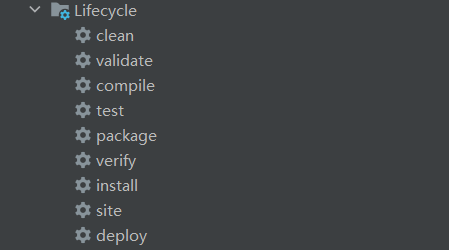
maven生命周期

上图所示,就是平时maven所有的执行方式,之前只知道clean是清除方法,install是打包方法等,但其实除了clean,下面的是按顺序执行的,比如执行test,会先执行validate、compile,后面的方法同理。
那它们每个都是什么意思:
- clean:清除项目构建结果
- validate:验证项目
- compile:编译项目源码,包括配置文件等
- test:编译测试代码,运行项目测试
- package:将项目打包成可发布的格式,如jar、war
- verify:对生成的包进行验证
- install:将项目构建结果发布到本地仓库或者远程仓库
- site:生成项目站点文件
- deploy:将项目构建结果部署到远程仓库或服务器
它们每个阶段都会根据规则执行相应的插件,比如compile阶段会执行maven-resources-plugin、maven-compiler-plugin等,只要引入了特定的插件,在执行到某个阶段时就会执行这个插件。有些插件是无法单独执行的,比如maven-jar-plugin等打包插件,如果没有编译的源码,是无法执行的,或者打包出来的包有问题,还有maven-install-plugin,如果没有前面的构建,也无法正常发布。下面是执行instal时,执行的阶段及对应的插件,有些阶段没有对应的插件,所以没有执行
1
2
3
4
5
6
7
8
9
10
11
12
13
14
15
16
17
18
19
20
21
| ------------------------------------compile
[INFO] --- maven-resources-plugin:2.6:resources (default-resources) @ SzbaDrainAgeManage ---
[INFO]
[INFO] --- maven-compiler-plugin:3.1:compile (default-compile) @ SzbaDrainAgeManage ---
[INFO]
------------------------------------test
[INFO] --- maven-resources-plugin:2.6:testResources (default-testResources) @ SzbaDrainAgeManage
[INFO]
[INFO] --- maven-compiler-plugin:3.1:testCompile (default-testCompile) @ SzbaDrainAgeManage ---
[INFO]
[INFO] --- maven-surefire-plugin:2.12.4:test (default-test) @ SzbaDrainAgeManage ---
[INFO]
------------------------------------package
[INFO] --- maven-jar-plugin:2.4:jar (default-jar) @ SzbaDrainAgeManage ---
[INFO]
[INFO] --- spring-boot-maven-plugin:2.2.6.RELEASE:repackage (default) @ SzbaDrainAgeManage ---
[INFO]
[INFO] --- maven-assembly-plugin:3.1.1:single (make-assembly) @ SzbaDrainAgeManage ---
[INFO]
------------------------------------install
[INFO] --- maven-install-plugin:2.4:install (default-install) @ SzbaDrainAgeManage ---
|
maven package
maven package是打包执行包的时候,是比较重要的一个步骤,它包括一个引入第三方包的过程,这里一般只会引入maven定义的依赖包,自己手动添加的第三方依赖包是无法被一起打包的,哪怕通过一些方法将手动引入的第三方包一起打包,也很有可能出现一些出乎意料的问题,所以最好不用手动引入第三方包(包括system的方式)
maven profiles配置
profile配置可以选择不同的环境打包,像下面的配置,就有两个选择,第一个fat是使用spring-boot-maven-plugin打包,spring-boot-maven-plugin映入了maven-shade-plugin,所以会打包出一个超级jar包,即可运行jar文件中包括了主程序以及maven依赖包,第二个build使用maven-jar-plugin和maven-assembly-plugin,maven-jar-plugin会生成一个可执行jar包,但是不会包括第三方包,所以无法直接执行,而maven-assembly-plugin会将maven-jar-plugin和第三方包,以及自定义的一些文件一起打包成压缩包,并且通过配置使maven-jar-plugin生成的jar可以运行
1
2
3
4
5
6
7
8
9
10
11
12
13
14
15
16
17
18
19
20
21
22
23
24
25
26
27
28
29
30
31
32
33
34
35
36
37
38
39
40
41
42
43
44
45
46
47
48
49
50
51
52
53
54
55
56
57
58
59
60
61
62
63
64
65
66
67
68
69
70
71
72
73
74
75
76
77
78
| <profiles>
<profile>
<id>fat</id>
<build>
<plugins>
<plugin>
<groupId>org.springframework.boot</groupId>
<artifactId>spring-boot-maven-plugin</artifactId>
<configuration>
<mainClass>com.gisinfo.sand.SandApplication</mainClass>
<jvmArguments>-Dfile.encoding=UTF-8</jvmArguments>
</configuration>
<executions>
<execution>
<goals>
<goal>repackage</goal>
</goals>
</execution>
</executions>
</plugin>
</plugins>
</build>
</profile>
<profile>
<id>build</id>
<activation>
<activeByDefault>true</activeByDefault>
</activation>
<build>
<plugins>
<plugin>
<groupId>org.apache.maven.plugins</groupId>
<artifactId>maven-jar-plugin</artifactId>
<configuration>
<archive>
<addMavenDescriptor>false</addMavenDescriptor>
<manifest>
<addClasspath>true</addClasspath>
<classpathPrefix>./</classpathPrefix>
<mainClass>com.gisinfo.sand.SandApplication</mainClass>
</manifest>
</archive>
</configuration>
</plugin>
<plugin>
<artifactId>maven-assembly-plugin</artifactId>
<version>3.1.1</version>
<configuration>
<descriptors>
<descriptor>src/main/assembly/assembly.xml</descriptor>
</descriptors>
</configuration>
<executions>
<execution>
<id>make-assembly</id>
<phase>package</phase>
<goals>
<goal>single</goal>
</goals>
</execution>
</executions>
</plugin>
</plugins>
</build>
</profile>
</profiles>
|
maven-assembly-plugin
maven-assembly-plugin虽然在package阶段执行,但是并不会生成可发布的格式(jar、war),而是根据配置生成分发包(zip、tar.gz等),所以通常需要和其他package阶段的插件一起使用,比如maven-jar-plugin等,下面是assembly插件引入配置
1
2
3
4
5
6
7
8
9
10
11
12
13
14
15
16
17
18
19
20
21
22
23
24
25
26
27
28
29
30
31
32
33
34
35
36
37
38
39
40
41
| <plugin>
<groupId>org.apache.maven.plugins</groupId>
<artifactId>maven-jar-plugin</artifactId>
<configuration>
<archive>
<addMavenDescriptor>false</addMavenDescriptor>
<manifest>
<addClasspath>true</addClasspath>
<classpathPrefix>./</classpathPrefix>
<mainClass>com.gisinfo.sand.SandApplication</mainClass>
</manifest>
</archive>
</configuration>
</plugin>
<plugin>
<artifactId>maven-assembly-plugin</artifactId>
<version>3.1.1</version>
<configuration>
<descriptors>
<descriptor>src/main/assembly/assembly.xml</descriptor>
</descriptors>
</configuration>
<executions>
<execution>
<id>make-assembly</id>
<phase>package</phase>
<goals>
<goal>single</goal>
</goals>
</execution>
</executions>
</plugin>
|
1
2
3
4
5
6
7
8
9
10
11
12
13
14
15
16
17
18
19
20
21
22
23
24
25
26
27
28
29
30
31
32
33
34
35
36
37
38
39
40
41
42
43
44
45
46
47
48
49
50
51
52
53
54
55
56
57
58
59
60
61
62
63
64
65
66
67
68
69
70
71
72
73
74
75
76
77
78
79
80
| <assembly>
<id>bin</id>
<formats>
<format>zip</format>
</formats>
<includeBaseDirectory>true</includeBaseDirectory>
<dependencySets>
<dependencySet>
<useProjectArtifact>false</useProjectArtifact>
<outputDirectory>lib</outputDirectory>
<unpack>false</unpack>
</dependencySet>
</dependencySets>
<fileSets>
<fileSet>
<directory>src/main/assembly/bin</directory>
<outputDirectory>bin</outputDirectory>
<fileMode>0755</fileMode>
<lineEnding>unix</lineEnding>
<filtered>true</filtered>
</fileSet>
<fileSet>
<directory>src/main/assembly/config</directory>
<outputDirectory>config</outputDirectory>
<fileMode>0644</fileMode>
</fileSet>
<fileSet>
<directory>src/main/resources</directory>
<outputDirectory>/config</outputDirectory>
<filtered>true</filtered>
</fileSet>
<fileSet>
<directory>${project.build.directory}</directory>
<outputDirectory>lib</outputDirectory>
<includes>
<include>*.jar</include>
</includes>
</fileSet>
<fileSet>
<directory>.</directory>
<outputDirectory>docs</outputDirectory>
<includes>
<include>*.md</include>
</includes>
<fileMode>0644</fileMode>
</fileSet>
<fileSet>
<directory>docs</directory>
<outputDirectory>docs</outputDirectory>
<fileMode>0644</fileMode>
</fileSet>
<fileSet>
<directory>src/main/assembly/docs</directory>
<outputDirectory>docs</outputDirectory>
<fileMode>0644</fileMode>
</fileSet>
</fileSets>
</assembly>
|
引入上述配置后,在package阶段会自动生成一个zip文件,这个zip文件包括项目执行jar包、第三方依赖包(maven依赖)、配置等
-Dspring.config.location
java -Dspring.config.location=/config -jar xxx.jar
spring.config.location是设置spring配置文件路径的,仅针对spring相关配置文件,自定义配置文件需要使用org.springframework.core.env.PropertyResolver#getProperty(“spring.config.location”)路径。
没有配置spring.config.location时,spring默认读取项目classpath(jar包项目类文件的根目录)目录配置文件,但是getProperty(“spring.config.location”)为空,所以如果项目中使用spring.config.location,需要加入判空逻辑,除了classpath,默认还有其他路径,并且优先级更高,分别为
- jar包所在目录下的config文件夹
- jar包所在目录
- jar包classpath目录
优先级从上往下
-Dlogging.config
-Dlogging.config是Java系统属性,用于配置日志配置文件地址,spring boot也是用到它,如果不配置
-Dlogging.config,那么会使用classpath:/xxx.xml,spring boot默认使用的是Logback,也就是logback-spring.xml,可以在启动时配置logback-spring.xml的位置,示例:-Dlogging.config=./config/logback-spring.xml
Java读取资源相关方法
1
2
3
4
5
6
7
8
9
10
11
12
13
14
15
16
17
18
19
20
21
22
23
24
25
26
27
28
29
30
31
32
33
34
35
36
37
38
39
40
41
42
43
44
45
46
47
48
49
50
51
52
53
54
55
56
57
58
59
60
61
62
63
64
65
| public String test() {
System.out.println(environment.getActiveProfiles());
System.out.println(environment.getDefaultProfiles());
System.out.println("this.getClass().getClassLoader().getResourceAsStream");
try {
System.out.println(IoUtil.read(this.getClass().getClassLoader().getResourceAsStream("test.txt"), CharsetUtil.UTF_8));
}catch (Exception e){
System.out.println("fail");
}
System.out.println("this.getClass().getResourceAsStream");
try {
System.out.println(IoUtil.read(this.getClass().getResourceAsStream("/test.txt"), CharsetUtil.UTF_8));
}catch (Exception e){
System.out.println("fail");
}
System.out.println("resourceLoader.getResource");
try {
System.out.println(IoUtil.read(resourceLoader.getResource("classpath:test.txt").getInputStream(), CharsetUtil.UTF_8));
System.out.println(IoUtil.read(resourceLoader.getResource("file:C:\\Users\\pengtong\\Desktop\\test.txt").getInputStream(), CharsetUtil.UTF_8));
}catch (Exception e){
System.out.println("fail");
}
System.out.println("ResourceUtils.getFile");
try {
System.out.println(IoUtil.read(new FileInputStream(ResourceUtils.getFile("classpath:test.txt")), CharsetUtil.UTF_8));
System.out.println(IoUtil.read(resourceLoader.getResource("file:C:/Users/pengtong/Desktop/test.txt").getInputStream(), CharsetUtil.UTF_8));
}catch (Exception e){
System.out.println("fail");
}
System.out.println("applicationContext.getResource");
try {
System.out.println(IoUtil.read(applicationContext.getResource("classpath:test.txt").getInputStream(), CharsetUtil.UTF_8));
System.out.println(IoUtil.read(resourceLoader.getResource("file:C:/Users/pengtong/Desktop/test.txt").getInputStream(), CharsetUtil.UTF_8));
}catch (Exception e){
System.out.println("fail");
}
System.out.println("new File");
try {
System.out.println(IoUtil.read(new FileInputStream(new File("src/main/resources/test.txt")), CharsetUtil.UTF_8));
}catch (Exception e){
System.out.println("fail");
}
System.out.println("Paths.get");
try {
System.out.println(IoUtil.read(new FileInputStream(Paths.get("src/main/resources/test.txt").toFile()), CharsetUtil.UTF_8));
}catch (Exception e){
System.out.println("fail");
}
System.out.println("new ClassPathResource");
try {
System.out.println(IoUtil.read(new ClassPathResource("test.txt").getInputStream(), CharsetUtil.UTF_8));
}catch (Exception e){
System.out.println("fail");
}
System.out.println("");
System.out.println(test);
return test;
}
|
代码中所有classpath:+相对路径可以换成file:+绝对路径,底层其实就是使用了java.net.URL,所以和new File()有所区别