依赖
1 | <dependency> |
现在Spring Cloud的环境下,一般引入以下依赖,spring-cloud-starter-oauth2包括了spring-security-oauth2-autoconfigure
1 | <dependency> |
授权服务器
密码编码器
1 |
|
向Spring注册PasswordEncoder,PasswordEncoder就是密码加密器,用来对数据加密以及验证密码等数据是否匹配,主要实现是BCryptPasswordEncoder,Spring Security默认使用的就是BCryptPasswordEncoder,因为可能涉及到循环依赖的问题,所以不能把PasswordEncoder放进Spring Security的配置和Oauth2授权配置中注册
用户服务配置
1 |
|
这里我们自己非常简单的实现了一个用户服务,但是Spring Security默认提供了几种实现方式,主要可以参考org.springframework.security.provisioning.JdbcUserDetailsManager类,这个类默认实现了数据库管理用户的方式,如果需要使用该类,使用@Bean自动注入即可
Spring Security的配置
1 |
|
- configure(AuthenticationManagerBuilder auth):通过调用auth相关方法配置用户授权
- userDetailsService():配置用户服务,主要方法是loadUserByUsername,通过用户名获取用户,可以使用Spring Security默认实现的,也可以自己实现
- passwordEncoder():用来配置加密方法,这里的作用校验密码,可以理解为用来加密用户输入的密码来和数据库中用户的密码进行比较,**所以这里配置的加密方法需要和用户密码加密方式一致,**不配置默认为BCryptPasswordEncoder
- authenticationManager():将继承获得的AuthenticationManager注册进Spring
Oauth2授权配置
1 |
|
- configure(AuthorizationServerEndpointsConfigurer endpoints):通过调用endpoints相关方法配置授权
- tokenStore():配置token具体内容存储方式,主要有JdbcTokenStore和JwtTokenStore,使用JwtTokenStore时需要配置JwtAccessTokenConverter,这个决定了资源服务器如何获取授权token具体内容,JdbcTokenStore通过将token具体内容存入数据库,然后传递一个主键id给资源服务器,资源服务器通过这个主键id在数据库中查询数据,JwtTokenStore将token具体内容放在jwt中,利用jwt的特性保证token具体内容的准确性
- authenticationManager(authenticationManager):配置授权管理器,这里的authenticationManager就是在OAuth2SecurityConfig注册的,如果不设置的话,密码模式就无法正常使用
- configure(ClientDetailsServiceConfigurer clients):通过调用clients相关方法配置client(客户端)
- jdbc():配置数据源,调用这个方式就决定了将client信息存储在数据库中
- inMemory():调用该方法就决定了将client存储在内存中,具体信息需要在该方法后面进行配置,并且不会持久化,这里我们没有使用,可自行了解
- passwordEncoder():配置client加密方式,主要作用于org.springframework.security.oauth2.provider.client.JdbcClientDetailsService,可以具体查看此类代码了解密码加密器的作用
- configure(AuthorizationServerSecurityConfigurer security):利用security相关方法,进行安全相关配置
- passwordEncoder():配置client授权时的加密方式,可以理解为用来加密用户输入的client密码来和数据库中client的密码进行比较,**所以这里配置的加密方法需要和cleint密码加密方式一致,**不配置默认为BCryptPasswordEncoder
- checkTokenAccess():配置check_token接口的访问权限,主要有
- permitAll(): 允许所有请求访问访问令牌验证接口,不进行访问控制。
- isAuthenticated(): 仅允许经过身份验证的用户访问访问令牌验证接口。
- hasAuthority(String authority): 限制仅具有指定权限的用户可以访问访问令牌验证接口。
- hasAnyAuthority(String… authorities): 限制仅具有指定权限之一的用户可以访问访问令牌验证接口。
- hasRole(String role): 限制仅具有指定角色的用户可以访问访问令牌验证接口。
- hasAnyRole(String… roles): 限制仅具有指定角色之一的用户可以访问访问令牌验证接口。
- tokenKeyAccess():配置token_key接口的访问权限,主要配置和checkTokenAccess方法一致
- tokenStore():向spring注册TokenStore,TokenStore的作用可理解为生成和验证token,即token管理,主要有JwtTokenStore、JdbcTokenStore、RedisTokenStore等,分别基于Jwt、数据库、Redis管理Token
- jwtAccessTokenConverter():向Spring注册JwtAccessTokenConverter,因为这里我们使用的是JdbcTokenStore,所以被注释掉了,它的作用可以理解为如何生成以及解析Jwt,如果我们使用的是JwtTokenStore,就需要使用到这个类
生成token过程
1 | public interface AuthorizationServerTokenServices { |
Spring Security Oauth2生成依靠AuthorizationServerTokenServices,源码中它只有一个默认实现类org.springframework.security.oauth2.provider.token.DefaultTokenServices,如果需要配置自己实现的AuthorizationServerTokenServices,可以在上面的Oauth2授权配置中的configure(AuthorizationServerEndpointsConfigurer endpoints),调用endpoints的tokenServices方法进行配置,具体AuthorizationServerTokenServices如何生效的,可以参考org.springframework.security.oauth2.provider.endpoint.TokenEndpoint#postAccessToken方法,也就是对外的/oauth/token节点
1 | public OAuth2AccessToken createAccessToken(OAuth2Authentication authentication) throws AuthenticationException { |
这是DefaultTokenServices实现的createAccessToken方法,可以看到是依靠TokenStore生成token
总结
整个授权服务器主要有两个配置,Spring Security的配置主要就是用户的配置,Oauth2授权配置主要就是配置client以及token
资源服务器
Oauth2配置
1 |
|
- configure(ResourceServerSecurityConfigurer resources):通过resources配置资源服务相关配置
- resourceId():配置当前资源的id,作用是与client的resource_ids匹配,如果client的resource_ids中不包括当前资源的id,则无法授权
- tokenStore():配置资源服务器的TokenStore,这里配置的需要和授权服务器一致,否则无法授权
- tokenServices():配置token服务,如果不配置默认为org.springframework.security.oauth2.provider.token.DefaultTokenServices,这个类使用TokenStore验证和解析token,如果这里配置了其他tokenServices,那么配置的TokenStore就没用了,如果配置为org.springframework.security.oauth2.provider.token.RemoteTokenServices,这个类使用远程调用授权服务器的接口验证和解析token
- configure(HttpSecurity http):配置资源服务器,该类可以进行很多配置,详情参考该类,不同的配置可以and连接
- authorizeRequests():配置接口访问权限
- 匹配请求
- anyRequest():匹配任何请求
- antMatchers(String… antPatterns):匹配参数中的数据接口
- 匹配请求的访问权限
- authenticated():已授权的用户可访问
- hasAnyRole(String… roles):已授权并且拥有参数中的角色的用户可访问
- 匹配请求
- exceptionHandling():配置异常处理程序,和上面的authorizeRequests()同时使用时,使用and()方法连接
- authorizeRequests():配置接口访问权限
- tokenStore():向Spring注入TokenStore,需要和授权服务器一致
- jwtAccessTokenConverter():向Spring注册JwtAccessTokenConverter,因为这里我们使用的是JdbcTokenStore,所以被注释掉了,它的作用可以理解为如何生成以及解析Jwt,如果我们使用的是JwtTokenStore,就需要使用到这个类
- tokenServices():向Spring注册ResourceServerTokenServices,ResourceServerTokenServices是真正验证和解析token的类,TokenStore是在ResourceServerTokenServices的子类中生效的,这里我们使用TokenStore,默认使用DefaultTokenServices,所以不许配置ResourceServerTokenServices
验证和解析token过程
1 | public interface AuthenticationManager { |
AuthenticationManager是Spring Security身份验证接口,这个接口的authenticate就是整体验证方法,具体验证方法必须实现这个接口
1 | public Authentication authenticate(Authentication authentication) throws AuthenticationException { |
OAuth2AuthenticationManager是Spring Security Oauth2实现的AuthenticationManager(身份验证管理器),方法里面使用ResourceServerTokenServices验证和解析token
1 | public interface ResourceServerTokenServices { |
ResourceServerTokenServices接口有两个方法,loadAuthentication验证token,readAccessToken获取token内容
1 | public OAuth2Authentication loadAuthentication(String accessTokenValue) throws AuthenticationException, InvalidTokenException { |
Spring Security Oauth2默认使用的是DefaultTokenServices,DefaultTokenService的loadAuthentication使用TokenStore管理token,我们也可以自己配置ResourceServerTokenServices,比如配置RemoteTokenServices,它通过远程调用授权服务器,验证和解析token
用户管理
如果想在资源服务器的代码中管理用户信息,需要根据TokenStore不同编写不同的代码,不过以下代码可以参考
1 | OAuth2Authentication authentication = (OAuth2Authentication) SecurityContextHolder.getContext().getAuthentication(); |
这样可以获取用户的用户名和角色
Client主要参数介绍
- client_id:id,client的标识,相当于用户的用户名
- resource_ids:资源id,多个值用逗号隔开,代表当前client可以访问哪些资源
- client_secret:client的密码,在访问/oauth/token接口时,需要提交该参数
- scope:可访问的范围,多个值用逗号隔开,可通过@PreAuthorize(“#oauth2.hasScope(‘scope’)”)控制具体接口的权限,scope比resource_ids控制的粒度更细,可以控制到具体的接口,具体控制权限方式参考org.springframework.security.oauth2.provider.expression.OAuth2SecurityExpressionMethods,#oauth2代表的就是OAuth2SecurityExpressionMethods,scope除了配置的外,还可以通过在访问/oauth/authorize接口时设置scope参数控制scope,但是值必须是配置中有的,另外,如果在访问/oauth/authorize接口时设置多个scope,使用空格隔开
- authorized_grant_types:生成token的模式,多个值用逗号隔开,具体可选值参考org.springframework.security.oauth2.provider.TokenGranter的实现类,可选值如下
- authorization_code:授权码模式
- implicit:简化模式
- password:密码模式
- client_credentials:客户端模式
- refresh_token:是否允许通过刷新令牌获取授权令牌
- web_server_redirect_uri:可重定向路径,即/oauth/authorize接口中redirect_uri的可选值,多个只用逗号隔开
- authorities:授权,多个值用逗号隔开,可通过@PreAuthorize(“#oauth2.clientHasRole(‘authoritie’)”)控制具体接口的权限,具体和scope类似
- access_token_validity:授权令牌有效期,即当前client访问一次令牌的时效
- refresh_token_validity:刷新令牌有效期
- additional_information:client额外的信息,可通过json配置更多的信息
- autoapprove:是否自动批准,如果是false,则登录后在浏览器会有一个批准界面
刷新令牌
oauth2授权服务器在给应用服务器颁发授权令牌的时候,同时还会颁发一个刷新令牌,如果授权令牌过期,在刷新令牌有效期内可以使用刷新令牌访问/oauth/token接口,重新获取授权令牌,访问示例:http://127.0.0.1:9000/oauth/token?grant_type=refresh_token&refresh_token=<刷新令牌>,使用刷新令牌而不是直接将授权令牌的时间加长一点,是因为刷新令牌是可控的,而直接将授权令牌的时间加长是不可控的
Oauth2四种模式
授权码模式(Authorization Code Grant)
本章将使用Oauth2授权码模式,这也是Oauth2四种模式在第三方登录的情况下最安全的一种模式,适用于具有服务器端的应用程序,例如Web应用。用户在客户端界面上发起授权请求,将被重定向到授权服务器进行身份验证。一旦用户授权,授权服务器将颁发一个授权码,然后客户端使用该授权码在授权服务器上进行验证,并交换访问令牌和刷新令牌。
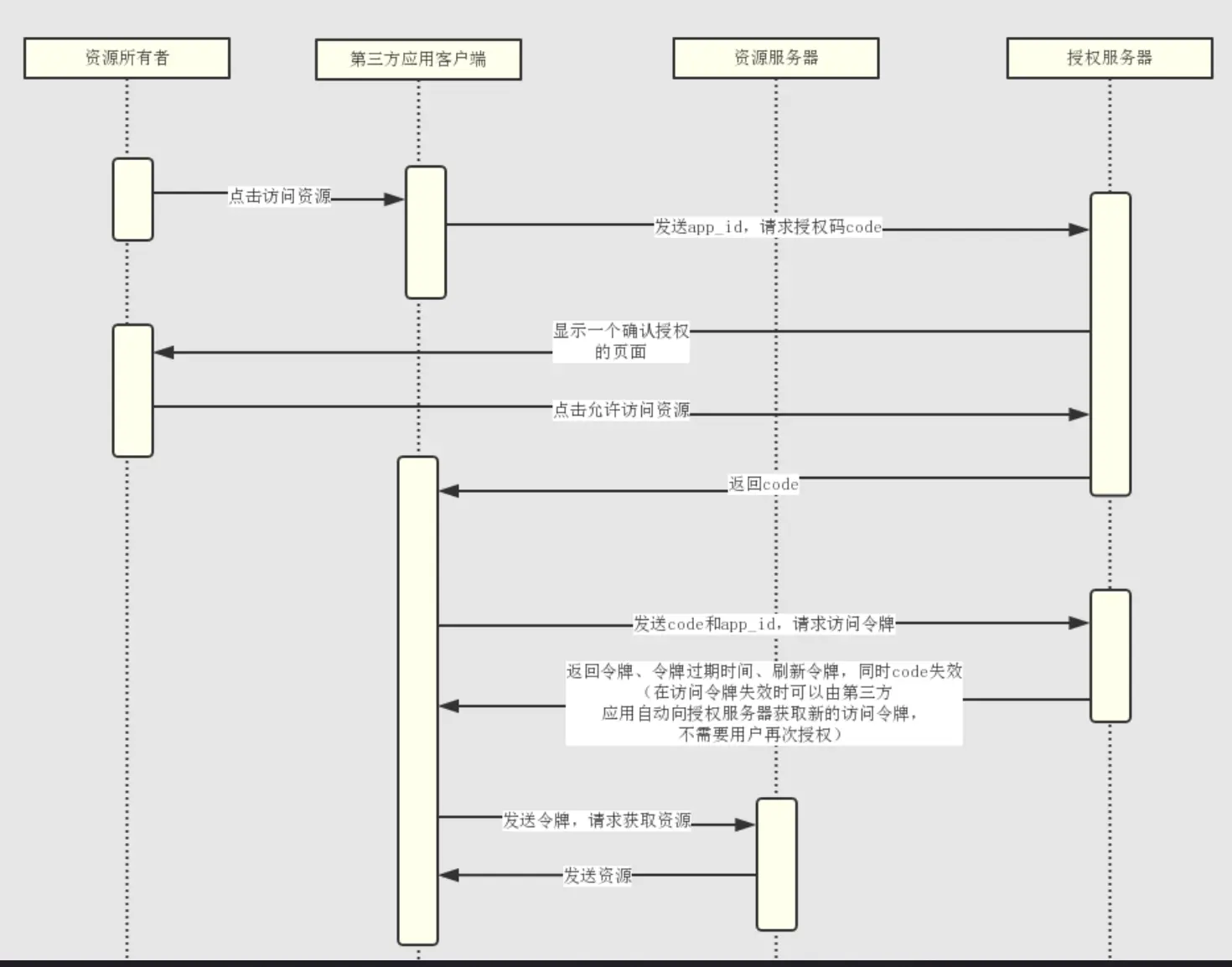
- 为什么需要去指定页面登录
因为如果在第三方软件页面登录,会造成密码泄漏,所以必须在自己的页面输入密码 - 为什么请求玩code还需要在请求一个access_token
因为登录是在自己的页面完成的,所以没办法将code直接传给第三方,只能通过浏览器重定向实现code的发送,所以code本身是不安全的,故需要利用code再次请求access_token,code请求一次就是失效了,也是为了安全
简图
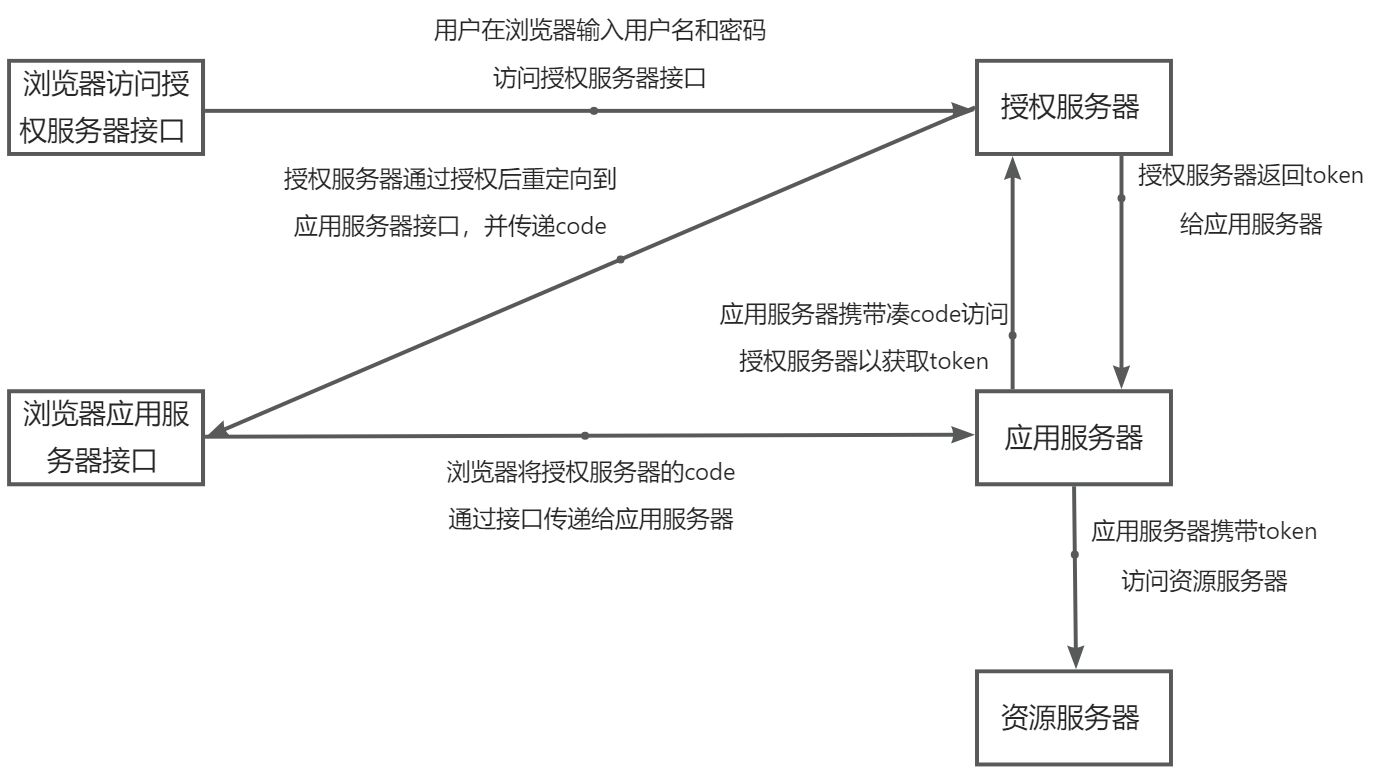
接口调用过程
- 浏览器输入http://127.0.0.1:9000/oauth/authorize?client_id=dev&redirect_uri=<重定向接口,一般就是你应用的接口>&response_type=code&scope=app,浏览器会弹出账号密码输入界面,输入账号密码,点击登录
- 登录成功后,浏览器重定向到你设置的重定向的接口,并将生成的code作为参数,请求传到应用服务端,应用服务端收到code后将client的账号密码放进Authorization请求http://127.0.0.1:9000/oauth/token?grant_type=authorization_code&code=<重定向的code>&redirect_uri=<上面写的重定向的地址,只起到验证的效果>,授权服务器验证过code后,返回access_token给应用服务端
简化模式(Implicit Grant)
适用于没有服务器端的应用程序,例如纯前端JavaScript应用。与授权码模式类似,用户在客户端界面上发起授权请求,将被重定向到授权服务器进行身份验证。一旦用户授权,授权服务器将直接颁发访问令牌给客户端,不再提供授权码。这种模式下,访问令牌会直接传递给客户端,因此需要确保传输通道的安全性。
简图
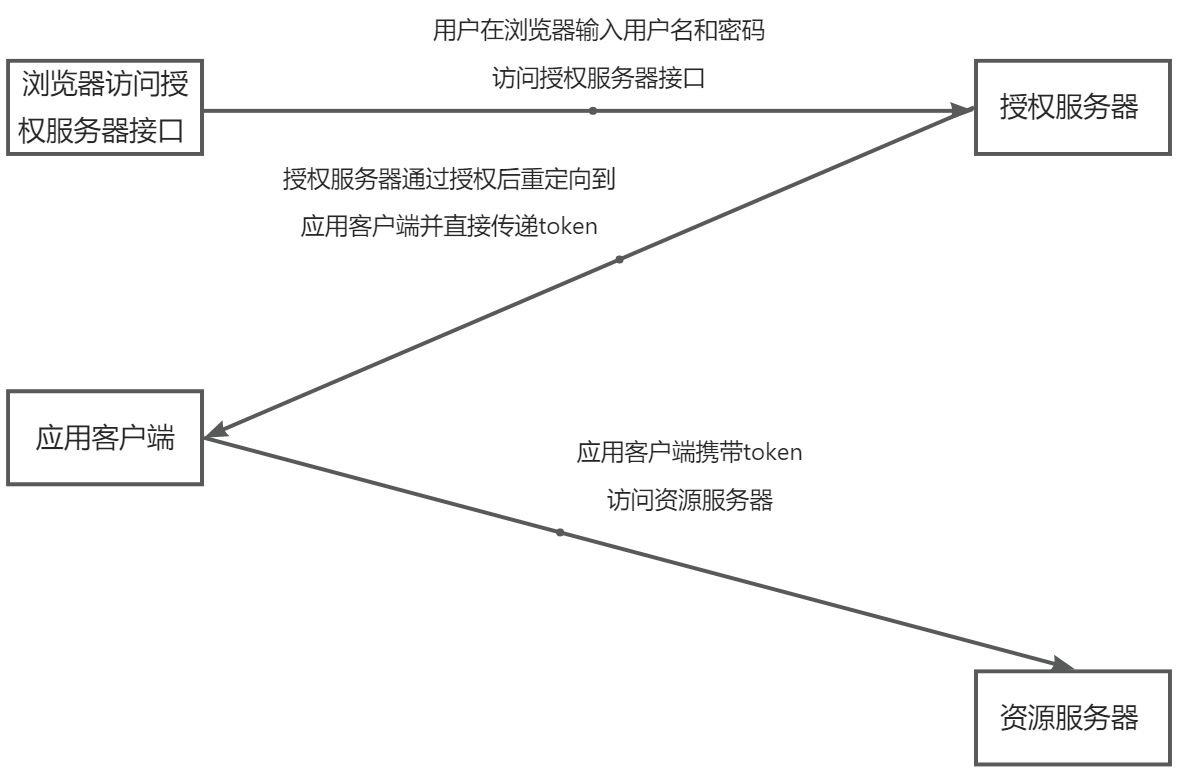
接口调用过程
- 浏览器输入http://127.0.0.1:9000/oauth/authorize?client_id=dev&redirect_uri=<重定向接口,一般就是你应用的接口>&response_type=token&scope=app,浏览器会弹出账号密码输入界面,输入账号密码,点击登录
- 登陆成功后,浏览器重定向到设置的重定向接口,并将生成的access_token作为参数,这里的access_token就是访问令牌,所以不需要像授权码模式一样再经过后台访问授权服务器拿到令牌
密码模式(Password Grant)
适用于高度信任的应用程序,例如可信任的原生移动应用。在密码模式下,用户直接向客户端提供其凭据(用户名和密码),客户端将凭证发送到授权服务器进行验证。一旦验证成功,授权服务器直接颁发访问令牌给客户端。这种模式要求客户端存储用户凭证,并且不适用于公共客户端。
简图
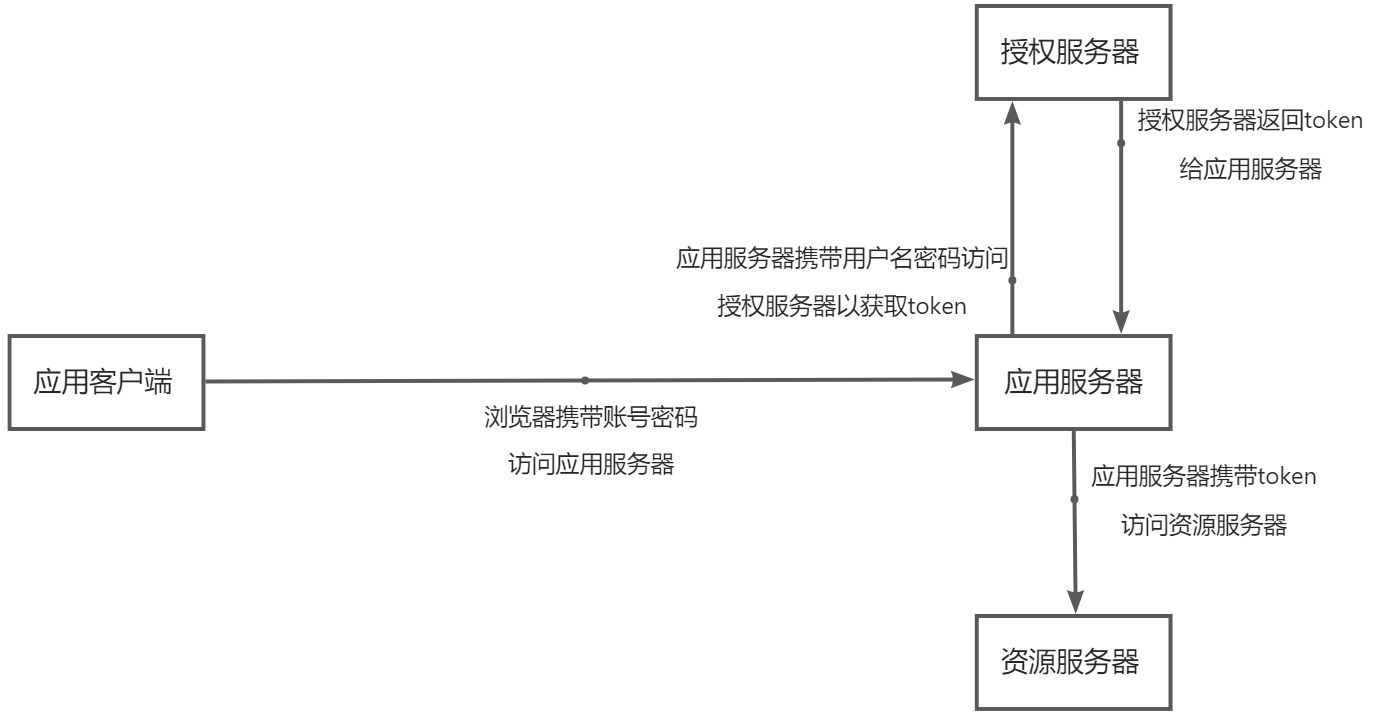
接口调用过程
- 浏览器输入应用服务器登录接口,并且传递用户账号名密码,后台收到用户名账号和密码后,将client的账号密码放进Authorization并携带用户名账号和密码访问授权服务器获取token的接口http://127.0.0.1:9000/oauth/token?grant_type=password&username=<用户输入的用户名>&password=<用户输入的密码>
- 授权服务器通过验证后,返回access_token给应用服务器,这里不需要像授权码模式一样需要访问授权服务器的授权接口重定向后再访问应用服务器,而是直接访问应用服务器就可以了
客户端模式(Client Credentials Grant)
适用于无关用户操作的情况,如何应用服务器后台定时任务需要访问资源,这种不涉及用户的操作不存在用户验证,可以直接通过client信息获取token。在客户端模式下,客户端使用自己的凭据向授权服务器发起授权请求,授权服务器对客户端进行验证,并直接颁发访问令牌。这种模式下,不涉及用户的身份验证。
简图
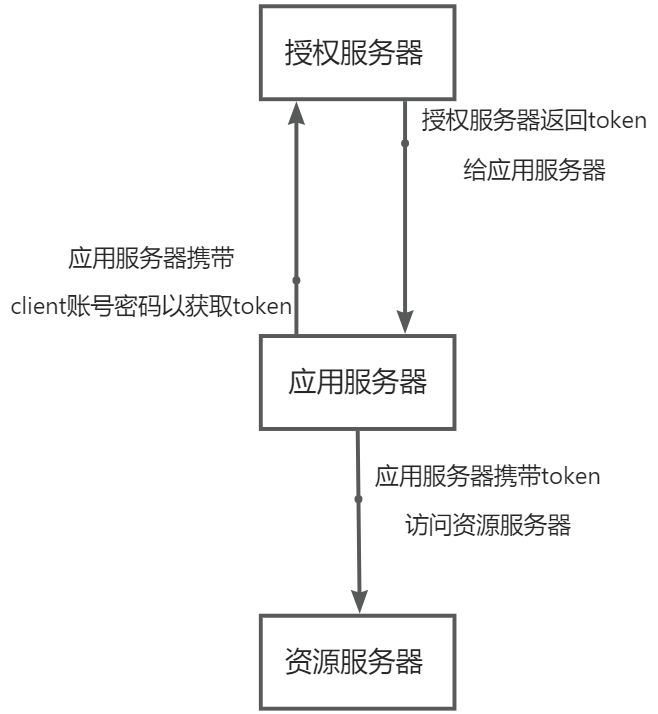
接口调用过程
- 应用后台将client的账号密码放进Authorization并访问授权服务器获取token接口http://127.0.0.1:9000/oauth/token?grant_type=client_credentials,授权服务器收到并且验证通过后,直接返回access_token
JWT
结构
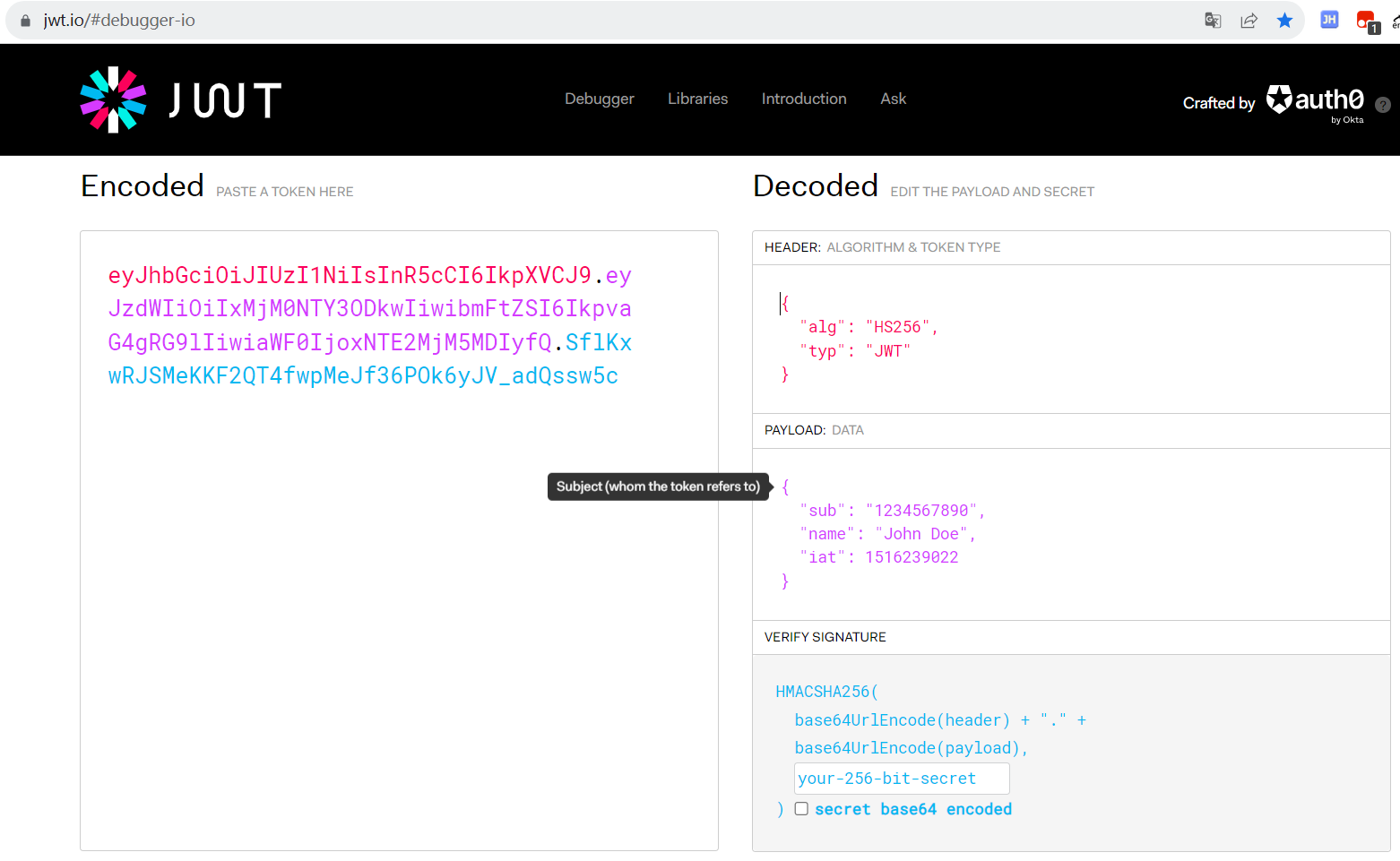
JWT分为三部分
- 头部(Header):头部通常由两部分组成,类型和算法。类型是固定的,表示令牌的类型为JWT。算法用于签名验证和生成签名。常见的算法包括HMAC SHA256和RSA。头部会被Base64编码。
- 载荷(Payload):载荷是JWT的主要部分,包含了一些声明(Claims),用于描述身份信息、用户权限等相关内容。它可以是预定义的声明,如过期时间(exp)、发布时间(iat),也可以是自定义的声明。载荷也会被Base64编码。
- 签名(Signature):签名是使用私钥对头部和载荷进行加密生成的一段字符串。签名的目的是验证令牌的真实性和完整性。接收到JWT后,服务器使用相同的算法和密钥对头部和载荷进行解密,并验证签名是否与解密后的内容匹配。
作用
在单机的情况下,web应用一般使用cookie存储用户信息,但是在分布式的情况下就不实用了,比如A应用存储了当前用户的信息,当前用户可以访问,但是B应用没有存储,则不能访问,这样就出现问题了,在这种情况下,一般会引入分布式缓存(如Redis)用来存储用户信息,不过引入分布式缓存,提升了系统复杂性,并且查询和写入缓存也是一笔性能开销,对服务端性能会造成损耗,为了减少服务端的压力,JWT的出现将信息直接存储到客户端(每一个用户对应一个客户端,对于客户端的压力可以忽略不计),利用客户端存储用户信息,在非必要对用户信息加密的情况下,JWT使用签名保证用户信息的真实性(如果需要对用户信息加密,可以使用JWE,可以理解为JWT对载荷加密的版本,但是对载荷加密,生成的token会更大,而且加密解密也会增加性能的开销),不过虽然JWT对客户端没有压力,但是每次需要在请求中携带JWT token,增加了网络的开销,所以用户信息比较大时,使用分布式缓存可能更合适
对接口控制如何生效的
HttpSecurity对接口控制
HttpSecurity可以通过authorizeRequests()方法控制具体接口的访问权限,示例:http.authorizeRequests().antMatchers(“/order/**”).access(“#oauth2.hasScope(‘scope’)”);
控制/order/开头的接口,如果访问此类接口,client必须具有”scope”的scope
主要通过org.springframework.security.config.annotation.web.configurers.ExpressionUrlAuthorizationConfigurer#expressionHandler控制的,expressionHandler的定义是SecurityExpressionHandler类
1 | public interface SecurityExpressionHandler<T> extends AopInfrastructureBean { |
SecurityExpressionHandler有两个实现类
1 | public class DefaultWebSecurityExpressionHandler extends AbstractSecurityExpressionHandler<FilterInvocation> implements SecurityExpressionHandler<FilterInvocation> { |
createSecurityExpressionRoot方法实际返回的WebSecurityExpressionRoot对象就是真正控制访问权限的方法,例如http.authorizeRequests().antMatchers(“/order/**”).access(“hasRole(‘role’)”)中access中配置的hasRole方法来自于WebSecurityExpressionRoot,具体有哪些方法,参考WebSecurityExpressionRoot对象
1 | public class OAuth2WebSecurityExpressionHandler extends DefaultWebSecurityExpressionHandler { |
createEvaluationContextInternal返回的StandardEvaluationContext中的OAuth2SecurityExpressionMethods对象就是真正控制访问权限的方法,即http.authorizeRequests().antMatchers(“/order/**”).access(“#oauth2.hasScope(‘scope’)”)中access中配置的hasScope方法来自于OAuth2SecurityExpressionMethods,但是和WebSecurityExpressionRoot不一样的事,使用OAuth2SecurityExpressionMethods的方法需要写上#oauth2,#oauth2代表的就是OAuth2SecurityExpressionMethods,具体有哪些方法,参考OAuth2SecurityExpressionMethods对象
@PreAuthorize对方法控制
@PreAuthorize(“@rs.ok()”),@PreAuthorize主要依靠org.springframework.security.access.expression.method.ExpressionBasedPreInvocationAdvice#expressionHandler,expressionHandler的定义是MethodSecurityExpressionHandler
1 | public interface MethodSecurityExpressionHandler extends SecurityExpressionHandler<MethodInvocation> { |
可以看到MethodSecurityExpressionHandler是上面说的SecurityExpressionHandler的实现类,但是只定义拦截方法,SecurityExpressionHandler介意拦截方法,也可以定义拦截具体接口
所以@PreAuthorize对方法控制和HttpSecurity对接口控制使用的底层方法都是一样,依靠的就是SecurityExpressionHandler的实现类,所以它们参数中的方法也是一样的
@和#的区别
1 |
|
1 |
|
- # 占位符:
- 用于引用方法参数:如果你想要在权限表达式中引用方法的参数,可以使用 # 占位符。例如,@PreAuthorize(“hasRole(#role)”) 表示方法的参数 role 的值会作为权限表达式的一部分。
- 用于引用方法参数的属性或方法:如果方法参数是一个对象,你可以使用 # 操作符来访问其属性或调用其方法。例如,@PreAuthorize(“#user.isAdmin()”) 表示方法的参数 user 的 isAdmin() 方法的结果会作为权限表达式的一部分。
- 例如上面第一个代码,#rs代表的就是使用参数中的TestController rs作为验证身份方法的使用类,如果参数中没有rs就会报错,之前提到的http.authorizeRequests().antMatchers(“/order/**”).access(“#oauth2.hasScope(‘scope’)”)中的#oauth2也是如此,只是逻辑较为复杂,我们无法直接看到oauth2是如何作为参数的
- @ 占位符:
- 用于引用身份验证上下文对象的属性:如果你想要引用当前身份验证上下文对象 (Authentication) 中的属性,可以使用 @ 占位符。例如,@PreAuthorize(“@authentication.isAuthenticated()”) 表示身份验证上下文对象的 isAuthenticated() 方法的结果会作为权限表达式的一部分。
- 用于引用当前用户的主体信息:你可以使用 @ 操作符来访问当前用户的主体信息。例如,@PreAuthorize(“@principal.username == ‘admin’”) 表示当前用户的用户名为 “admin” 时才满足权限表达式。
- 例如上面第二个中的@rs中的rs就是一个上文对象,即注册到Spring的对象,不许在参数中定义了