普通http/https客户端
1
2
3
4
5
6
7
8
9
10
11
12
13
14
15
16
17
18
19
20
21
22
23
24
25
26
27
28
29
30
31
32
33
34
35
36
37
38
39
40
41
42
43
44
45
46
47
48
49
50
51
52
53
54
55
56
57
58
59
60
61
62
63
64
65
66
67
68
69
70
71
72
73
74
75
76
77
78
79
80
81
82
83
84
85
86
87
88
89
90
91
92
93
94
95
96
97
98
99
100
101
102
103
104
105
106
107
108
109
110
111
112
113
114
115
116
117
| public class HttpClient {
public static void main(String[] args) throws Exception {
EventLoopGroup group = new NioEventLoopGroup();
try {
SslContext sslContext = SslContextBuilder.forClient()
.sslProvider(SslProvider.OPENSSL)
.trustManager(InsecureTrustManagerFactory.INSTANCE)
.build();
Bootstrap bootstrap = new Bootstrap();
bootstrap.group(group)
.channel(NioSocketChannel.class)
.option(ChannelOption.SO_KEEPALIVE, true)
.remoteAddress(new InetSocketAddress("127.0.0.1", 8080))
.handler(new ChannelInitializer<NioSocketChannel>() {
@Override
protected void initChannel(NioSocketChannel ch) throws Exception {
ch.pipeline()
.addLast(sslContext.newHandler(ch.alloc()))
.addLast(new HttpClientCodec())
.addLast(new HttpObjectAggregator(1000000))
.addLast(new HttpClientHandler());
}
});
ChannelFuture channelFuture = bootstrap.connect().sync();
Channel channel = channelFuture.channel();
String url = "/query";
DefaultFullHttpRequest defaultHttpRequest = new DefaultFullHttpRequest(HttpVersion.HTTP_1_1, HttpMethod.POST, url);
defaultHttpRequest.headers().set(HttpHeaderNames.HOST, "127.0.0.1:8080");
HttpPostRequestEncoder httpPostRequestEncoder = new HttpPostRequestEncoder(defaultHttpRequest, true);
httpPostRequestEncoder.addBodyAttribute("param1","value1");
httpPostRequestEncoder.addBodyAttribute("param2","value2");
httpPostRequestEncoder.addBodyFileUpload("file","example.txt", new File("C:\\Users\\pengtong\\Desktop\\example.txt"), ContentType.TEXT_PLAIN.getValue(), true);
HttpRequest httpRequest = httpPostRequestEncoder.finalizeRequest();
channel.write(httpRequest);
HttpContent httpContent = httpPostRequestEncoder.readChunk(channel.alloc());
channel.writeAndFlush(httpContent);
channel.closeFuture().sync();
} finally {
group.shutdownGracefully();
}
}
@ChannelHandler.Sharable
static class HttpClientHandler extends ChannelInboundHandlerAdapter {
int i = 0;
long start = System.currentTimeMillis();
@Override
public void channelRead(ChannelHandlerContext ctx, Object msg) throws Exception {
if (msg instanceof FullHttpMessage) {
System.out.println(((FullHttpMessage)msg).content().toString(CharsetUtil.UTF_8));
System.out.println(System.currentTimeMillis() - start + "----------" + (i++));
}
}
}
}
|
http与https的区别就在于https需要构建一个SslContext,并且通过它生成一个SslHandler添加到channel pipeline中
http升级http2客户端
这里面的注释详细介绍到了netty channel pipeline的逻辑
1
2
3
4
5
6
7
8
9
10
11
12
13
14
15
16
17
18
19
20
21
22
23
24
25
26
27
28
29
30
31
32
33
34
35
36
37
38
39
40
41
42
43
44
45
46
47
48
49
50
51
52
53
54
55
56
57
58
59
60
61
62
63
64
65
66
67
68
69
70
71
72
73
74
75
76
77
78
79
80
81
82
83
84
85
86
87
88
89
90
91
92
93
94
95
96
97
98
99
100
101
102
103
104
105
106
107
108
109
110
111
112
113
114
115
116
117
118
119
120
121
122
123
124
125
126
127
128
129
130
131
132
133
134
135
136
137
138
139
140
141
142
143
144
145
146
147
148
149
150
151
152
153
154
155
156
157
158
159
160
161
162
163
164
165
166
167
168
169
170
171
172
173
174
175
176
177
178
179
180
181
182
183
184
185
186
187
188
189
190
191
192
193
194
195
196
197
198
199
200
201
202
203
| public class Http2UpgradeClient {
private static final String HOST = "127.0.0.1";
private static final int PORT = 8080;
private SendHandler sendHandler = new SendHandler();
public static void main(String[] args) throws Exception {
EventLoopGroup group = new NioEventLoopGroup();
try {
Bootstrap bootstrap = new Bootstrap();
bootstrap.group(group)
.channel(NioSocketChannel.class)
.option(ChannelOption.SO_KEEPALIVE, true)
.remoteAddress(new InetSocketAddress(HOST, PORT))
.handler(new ChannelInitializer<NioSocketChannel>() {
@Override
protected void initChannel(NioSocketChannel ch) throws Exception {
ch.pipeline().addLast(new HttpClientHandler());
}
});
ChannelFuture channelFuture = bootstrap.connect().sync();
Channel channel = channelFuture.channel();
DefaultFullHttpRequest upgradeRequest = new DefaultFullHttpRequest(HttpVersion.HTTP_1_1, HttpMethod.POST, "/query");
upgradeRequest.headers()
.add("HTTP2-Settings", "")
.add(HttpHeaderNames.UPGRADE, "h2c")
.add(HttpHeaderNames.CONNECTION, "HTTP2-Settings,upgrade");
channel.writeAndFlush(upgradeRequest);
channel.closeFuture().sync();
} finally {
group.shutdownGracefully();
}
}
@ChannelHandler.Sharable
static class HttpClientHandler extends HttpObjectAggregator {
private HttpRequestEncoder httpRequestEncoder;
private HttpResponseDecoder httpResponseDecoder;
public HttpClientHandler() {
super(1024);
}
@Override
public void handlerAdded(ChannelHandlerContext ctx) throws Exception {
httpRequestEncoder = new HttpRequestEncoder();
httpResponseDecoder = new HttpResponseDecoder();
ctx.pipeline().addBefore(ctx.name(), null, httpRequestEncoder).addBefore(ctx.name(), null, httpResponseDecoder);
SendHandler.sendHandler((line) -> {
DefaultFullHttpRequest defaultFullHttpRequest = new DefaultFullHttpRequest(HttpVersion.HTTP_1_1, HttpMethod.POST, "/query", Unpooled.wrappedBuffer(line.getBytes()));
defaultFullHttpRequest.headers()
.add(HttpHeaderNames.CONNECTION, "keep-alive")
.add(HttpHeaderNames.CONTENT_LENGTH, String.valueOf(line.length()));
ctx.writeAndFlush(defaultFullHttpRequest);
});
}
@Override
public void channelRead(ChannelHandlerContext ctx, Object msg) throws Exception {
if (msg instanceof HttpObject) {
List<Object> out = new ArrayList<>();
super.decode(ctx, (HttpObject) msg, out);
if (out.isEmpty()) {
return;
}
assert out.size() == 1;
FullHttpResponse fullHttpResponse = (FullHttpResponse) out.get(0);
if (fullHttpResponse.status() == HttpResponseStatus.SWITCHING_PROTOCOLS) {
Http2FrameCodec http2FrameCodec = Http2FrameCodecBuilder.forClient().build();
ctx.pipeline().remove(httpRequestEncoder);
ctx.pipeline().addLast(http2FrameCodec).addLast(new Http2ClientHandler()).remove(this).remove(httpResponseDecoder);
}
}
}
}
@ChannelHandler.Sharable
static class Http2ClientHandler extends Http2ChannelDuplexHandler {
@Override
protected void handlerAdded0(ChannelHandlerContext ctx) throws Exception {
SendHandler.sendHandler((line) -> {
Http2Headers headers = new DefaultHttp2Headers()
.scheme("http")
.method("GET")
.path("/query")
.set(HttpHeaderNames.CONTENT_TYPE, ContentType.JSON.toString(CharsetUtil.UTF_8))
.set(HttpHeaderNames.CONTENT_LENGTH, String.valueOf(line.length()))
.authority(HOST);
Http2FrameStream stream = newStream();
DefaultHttp2HeadersFrame headersFrame = new DefaultHttp2HeadersFrame(headers).stream(stream);
Http2DataFrame http2DataFrame = new DefaultHttp2DataFrame(Unpooled.copiedBuffer(line, CharsetUtil.UTF_8), true).stream(stream);
ctx.writeAndFlush(headersFrame);
ctx.writeAndFlush(http2DataFrame);
});
}
@Override
public void channelRead(ChannelHandlerContext ctx, Object msg) throws Exception {
if (msg instanceof Http2DataFrame) {
Http2DataFrame dataFrame = (Http2DataFrame) msg;
String content = dataFrame.content().toString(CharsetUtil.UTF_8);
System.out.println("Received response: " + content + " : " + dataFrame.stream().id());
}
}
@Override
public void exceptionCaught(ChannelHandlerContext ctx, Throwable cause) throws Exception {
cause.printStackTrace();
ctx.close();
}
}
static class SendHandler {
private Consumer<String> consumer;
private final Thread sendThread;
private static SendHandler sendHandler;
public static SendHandler sendHandler() {
if (sendHandler == null) {
sendHandler = new SendHandler();
}
return sendHandler;
}
public static SendHandler sendHandler(Consumer<String> consumer) {
if (sendHandler == null) {
sendHandler = new SendHandler(consumer);
} else {
sendHandler.setConsumer(consumer);
}
return sendHandler;
}
private SendHandler() {
this(System.out::println);
}
private SendHandler(Consumer<String> consumer) {
this.consumer = consumer;
BufferedReader bufferedReader = new BufferedReader(new InputStreamReader(System.in));
sendThread = new Thread(() -> {
try {
while (true) {
String line = bufferedReader.readLine();
if (Thread.currentThread().isInterrupted()) {
break;
}
this.consumer.accept(line);
}
} catch (IOException e) {
throw new RuntimeException(e);
}
});
sendThread.start();
}
public void shutdown() {
sendThread.interrupt();
}
public void setConsumer(Consumer<String> consumer) {
this.consumer = consumer;
}
}
}
|
这部分代码整体逻辑就是客户端提交一个http2的升级请求,如果返回的响应的状态码是101,则后续通过http2的逻辑发送请求以及接收响应。netty本身已经实现了一个HttpClientUpgradeHandler类,实现逻辑大致和这部分代码类似
http2客户端
这里的http2客户端没有使用加密,按道理一般的http2默认是加密的,这里的代码使用到了Http2StreamChannelBootstrap和Http2StreamChannel,可参考学习
1
2
3
4
5
6
7
8
9
10
11
12
13
14
15
16
17
18
19
20
21
22
23
24
25
26
27
28
29
30
31
32
33
34
35
36
37
38
39
40
41
42
43
44
45
46
47
48
49
50
51
52
53
54
55
56
57
58
59
60
61
62
63
64
65
66
67
68
69
70
71
72
73
74
75
76
77
78
79
80
81
82
83
84
85
86
87
88
89
| public class Http2Client {
private static final String HOST = "127.0.0.1";
private static final int PORT = 8080;
public static void main(String[] args) throws Exception {
EventLoopGroup group = new NioEventLoopGroup();
try {
Bootstrap bootstrap = new Bootstrap();
bootstrap.group(group)
.channel(NioSocketChannel.class)
.option(ChannelOption.SO_KEEPALIVE, true)
.remoteAddress(new InetSocketAddress(HOST, PORT))
.handler(new ChannelInitializer<NioSocketChannel>() {
@Override
protected void initChannel(NioSocketChannel ch) throws Exception {
ch.pipeline()
.addLast(Http2FrameCodecBuilder.forClient().build())
.addLast(new Http2MultiplexHandler(new ChannelInboundHandlerAdapter()));
}
});
ChannelFuture channelFuture = bootstrap.connect().sync();
Channel channel = channelFuture.channel();
new Thread(() -> {
Http2StreamChannelBootstrap http2StreamChannelBootstrap = new Http2StreamChannelBootstrap(channel);
BufferedReader bufferedReader = new BufferedReader(new InputStreamReader(System.in));
while (true) {
String line;
try {
line = bufferedReader.readLine();
} catch (IOException e) {
throw new RuntimeException(e);
}
Http2StreamChannel streamChannel = http2StreamChannelBootstrap.open().syncUninterruptibly().getNow();
streamChannel.pipeline().addLast(new Http2ClientHandler());
Http2Headers headers = new DefaultHttp2Headers()
.method("GET")
.path("/query")
.scheme("http")
.set(HttpHeaderNames.CONTENT_TYPE, ContentType.JSON.toString(CharsetUtil.UTF_8))
.set(HttpHeaderNames.CONTENT_LENGTH, String.valueOf(line.length()))
.authority(HOST);
DefaultHttp2HeadersFrame headersFrame = new DefaultHttp2HeadersFrame(headers).stream(streamChannel.stream());
Http2DataFrame http2DataFrame = new DefaultHttp2DataFrame(Unpooled.copiedBuffer(line, CharsetUtil.UTF_8), true).stream(streamChannel.stream());
streamChannel.writeAndFlush(headersFrame);
streamChannel.writeAndFlush(http2DataFrame);
}
}).start();
channel.closeFuture().sync();
} finally {
group.shutdownGracefully();
}
}
@ChannelHandler.Sharable
static class Http2ClientHandler extends ChannelInboundHandlerAdapter {
@Override
public void channelRead(ChannelHandlerContext ctx, Object msg) throws Exception {
if (msg instanceof Http2DataFrame) {
Http2DataFrame dataFrame = (Http2DataFrame) msg;
String content = dataFrame.content().toString(CharsetUtil.UTF_8);
System.out.println("Received response: " + content + " : " + dataFrame.stream().id());
ctx.channel().close();
}
}
@Override
public void exceptionCaught(ChannelHandlerContext ctx, Throwable cause) throws Exception {
cause.printStackTrace();
ctx.close();
}
}
}
|
https/http2(ssl/tls)客户端
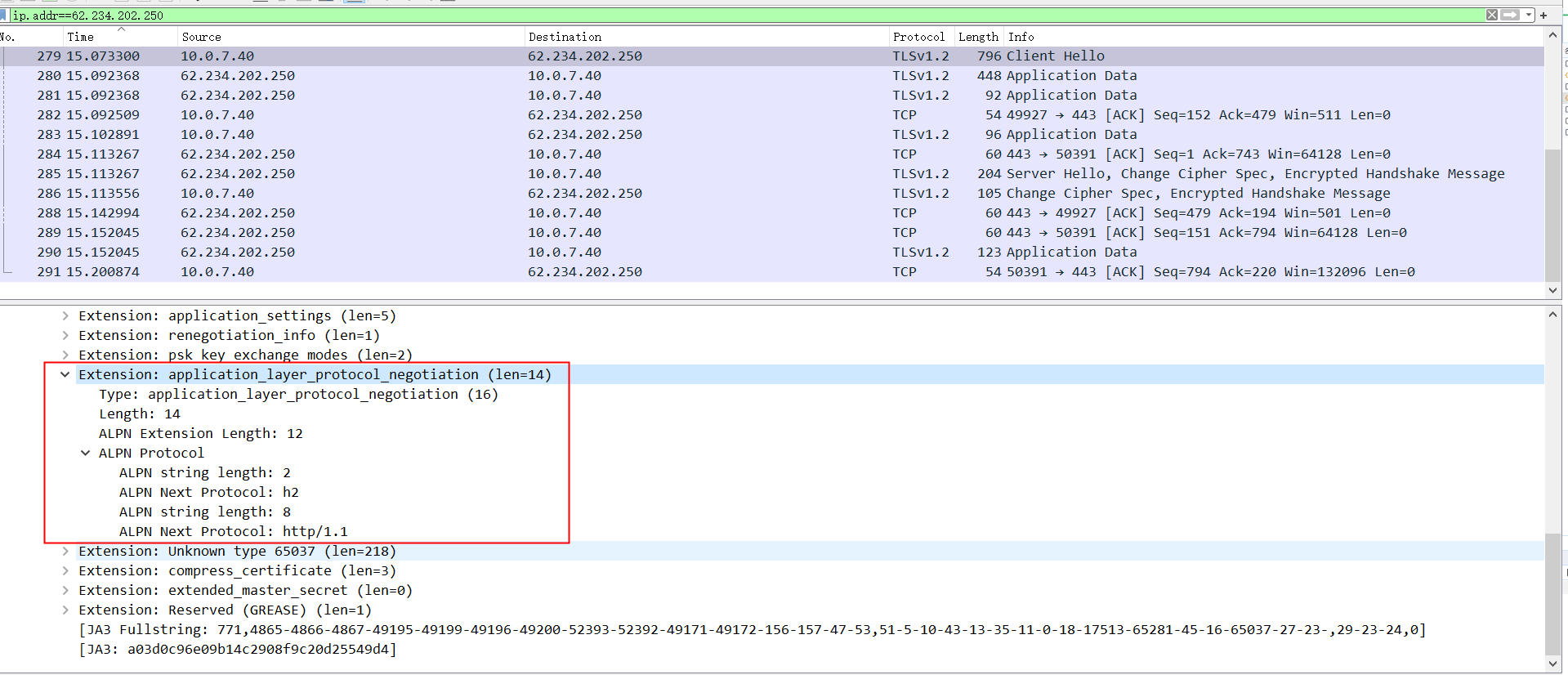
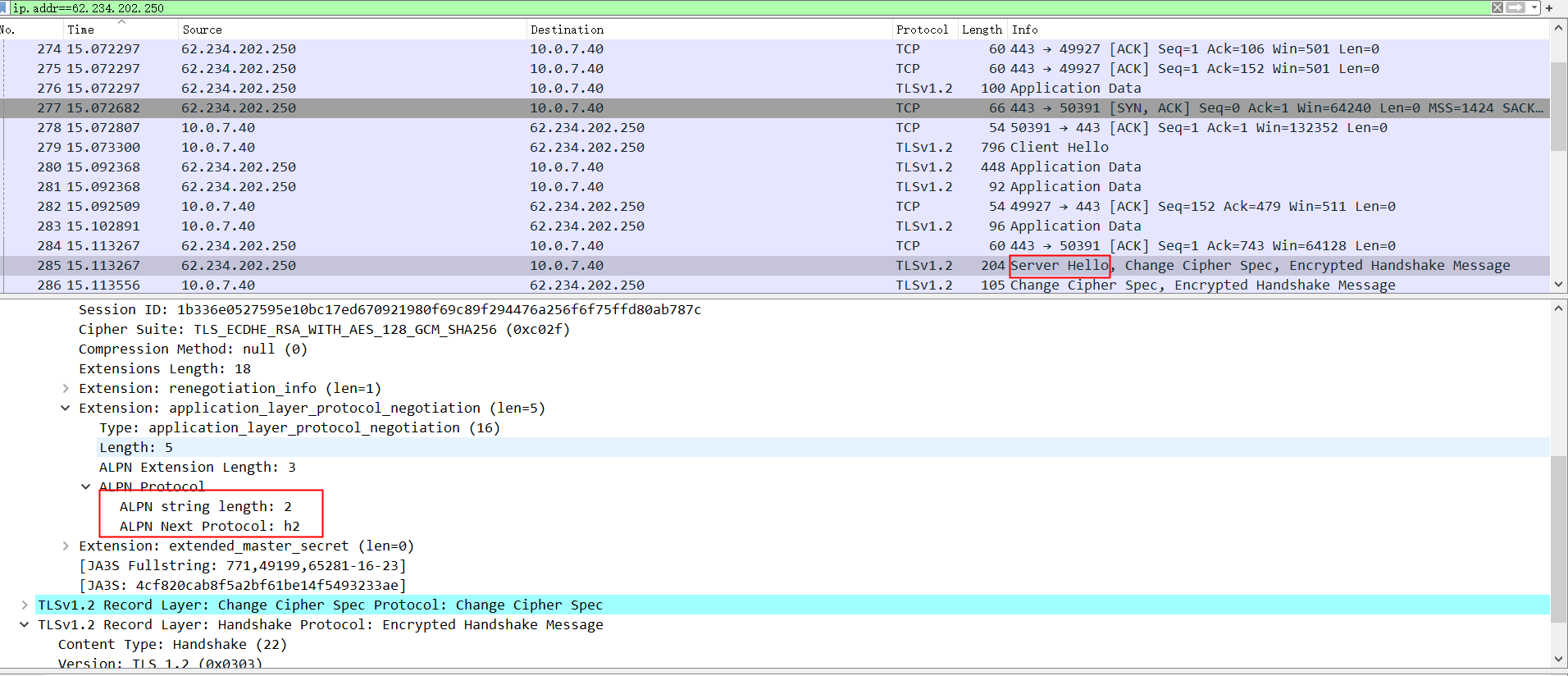
访问https的http2,需要加上加密,而且还需要配置应用层协议协商(ALPN),并且设置支持的协议包括h2、http/1.1,服务端会根据自身配置返回一个支持的协议并且后续按照该协议进行通讯,如果不配置应用层协议协商,那么会按照服务端配置的默认协议进行通讯,这个时候就很有可能出现客户端和服务端协议不一致的问题,比如服务端默认协议是http/1.1,而如果这个时候客户端按照http2协议进行请求,当客户端发送setting帧时,收到服务端的消息还是http1.1格式的报文,就会出现问题。除了ALPN,NPN也是协议协商,只是NPN基本被ALPN取代了。下面的代码同时支持http/1.1和http2,通过userEventTriggered获取ALPN协商的结果,然后修改客户端支持的协议
1
2
3
4
5
6
7
8
9
10
11
12
13
14
15
16
17
18
19
20
21
22
23
24
25
26
27
28
29
30
31
32
33
34
35
36
37
38
39
40
41
42
43
44
45
46
47
48
49
50
51
52
53
54
55
56
57
58
59
60
61
62
63
64
65
66
67
68
69
70
71
72
73
74
75
76
77
78
79
80
81
82
83
84
85
86
87
88
89
90
91
92
93
94
95
96
97
98
99
100
101
102
103
104
105
106
107
108
109
110
111
112
113
114
115
116
117
118
119
120
121
122
123
124
125
126
127
128
129
130
131
132
133
134
135
136
137
138
139
140
141
142
143
144
145
146
147
148
149
150
151
152
153
154
155
156
157
158
159
160
161
162
163
164
165
166
167
168
169
170
171
172
173
174
175
176
177
178
179
180
181
182
183
184
185
186
187
188
189
190
191
192
193
194
195
196
197
198
199
200
201
202
203
204
205
206
207
208
209
210
| package com.example.netty.client;
import cn.hutool.http.ContentType;
import io.netty.bootstrap.Bootstrap;
import io.netty.buffer.ByteBuf;
import io.netty.buffer.Unpooled;
import io.netty.channel.*;
import io.netty.channel.nio.NioEventLoopGroup;
import io.netty.channel.socket.nio.NioSocketChannel;
import io.netty.handler.codec.http.*;
import io.netty.handler.codec.http2.*;
import io.netty.handler.ssl.*;
import io.netty.handler.ssl.util.InsecureTrustManagerFactory;
import io.netty.util.CharsetUtil;
import java.io.BufferedReader;
import java.io.IOException;
import java.io.InputStreamReader;
import java.net.InetSocketAddress;
import java.util.HashMap;
import java.util.Map;
public class MyHttpClient {
private static final String HOST = "127.0.0.1";
private static final int PORT = 8080;
public static void main(String[] args) throws Exception {
EventLoopGroup group = new NioEventLoopGroup();
SslContext sslContext = SslContextBuilder.forClient()
.sslProvider(SslProvider.OPENSSL)
.trustManager(InsecureTrustManagerFactory.INSTANCE)
.applicationProtocolConfig(new ApplicationProtocolConfig(
ApplicationProtocolConfig.Protocol.ALPN,
ApplicationProtocolConfig.SelectorFailureBehavior.NO_ADVERTISE,
ApplicationProtocolConfig.SelectedListenerFailureBehavior.ACCEPT,
ApplicationProtocolNames.HTTP_1_1,
ApplicationProtocolNames.HTTP_2))
.build();
try {
Bootstrap bootstrap = new Bootstrap();
bootstrap.group(group)
.channel(NioSocketChannel.class)
.option(ChannelOption.SO_KEEPALIVE, true)
.remoteAddress(new InetSocketAddress(HOST, PORT))
.handler(new ChannelInitializer<NioSocketChannel>() {
@Override
protected void initChannel(NioSocketChannel ch) throws Exception {
ch.pipeline()
.addLast(sslContext.newHandler(ch.alloc()))
.addLast(new FrontHandler());
}
});
ChannelFuture channelFuture = bootstrap.connect().sync();
Channel channel = channelFuture.channel();
new Thread(() -> {
BufferedReader bufferedReader = new BufferedReader(new InputStreamReader(System.in));
while (true) {
String line;
try {
line = bufferedReader.readLine();
} catch (IOException e) {
throw new RuntimeException(e);
}
channel.writeAndFlush(line);
}
}).start();
channel.closeFuture().sync();
} finally {
group.shutdownGracefully();
}
}
static class FrontHandler extends ChannelInboundHandlerAdapter {
private final HttpClientCodec httpClientCodec;
private final HttpObjectAggregator httpObjectAggregator;
private final HttpClientHandler httpClientHandler;
private final Http2FrameCodec http2FrameCodec;
private final Http2ClientHandler http2ClientHandler;
public FrontHandler() {
this.httpClientCodec = new HttpClientCodec();
this.httpObjectAggregator = new HttpObjectAggregator(10240);
this.httpClientHandler = new HttpClientHandler();
this.http2FrameCodec = Http2FrameCodecBuilder.forClient().build();
this.http2ClientHandler = new Http2ClientHandler();
}
@Override
public void handlerAdded(ChannelHandlerContext ctx) throws Exception {
ctx.pipeline().addLast(httpClientCodec, httpObjectAggregator, httpClientHandler);
}
@Override
public void userEventTriggered(ChannelHandlerContext ctx, Object evt) throws Exception {
if (evt instanceof SslHandshakeCompletionEvent){
SslHandler sslHandler = ctx.pipeline().get(SslHandler.class);
String protocol = sslHandler.applicationProtocol();
if (protocol.equals(ApplicationProtocolNames.HTTP_2)) {
ctx.pipeline().remove(httpClientHandler).remove(httpObjectAggregator).remove(httpClientCodec)
.addLast(http2FrameCodec, http2ClientHandler)
.remove(this);
} else {
ctx.pipeline().remove(this);
}
}
}
}
@ChannelHandler.Sharable
static class Http2ClientHandler extends Http2ChannelDuplexHandler {
private Map<Integer, ByteBuf> byteBufMap = new HashMap<>();
Http2ClientHandler() {
}
@Override
public void channelRead(ChannelHandlerContext ctx, Object msg) throws Exception {
if (msg instanceof Http2DataFrame) {
Http2DataFrame dataFrame = (Http2DataFrame) msg;
int id = dataFrame.stream().id();
ByteBuf byteBuf = byteBufMap.get(id);
if (byteBuf == null){
byteBuf = dataFrame.content();
byteBufMap.put(id, byteBuf);
}else{
byteBuf.writeBytes(dataFrame.content());
}
if (dataFrame.isEndStream()){
String content = byteBuf.toString(CharsetUtil.UTF_8);
System.out.println("Received response: " + content + " : " + id);
byteBufMap.remove(id);
}
}
}
@Override
public void write(ChannelHandlerContext ctx, Object msg, ChannelPromise promise) throws Exception {
String message = (String) msg;
Http2FrameStream http2FrameStream = newStream();
Http2Headers headers = new DefaultHttp2Headers()
.method("GET")
.path("/activity/servicetime")
.scheme("https")
.authority(HOST + ":" + PORT)
.set(HttpHeaderNames.CONTENT_TYPE, ContentType.JSON.toString(CharsetUtil.UTF_8))
.set(HttpHeaderNames.CONTENT_LENGTH, String.valueOf(message.length()));
DefaultHttp2HeadersFrame headersFrame = new DefaultHttp2HeadersFrame(headers).stream(http2FrameStream);
Http2DataFrame http2DataFrame = new DefaultHttp2DataFrame(Unpooled.copiedBuffer(message, CharsetUtil.UTF_8), true).stream(http2FrameStream);
ctx.write(headersFrame);
ctx.writeAndFlush(http2DataFrame);
}
@Override
public void exceptionCaught(ChannelHandlerContext ctx, Throwable cause) throws Exception {
cause.printStackTrace();
ctx.close();
}
}
@ChannelHandler.Sharable
static class HttpClientHandler extends ChannelDuplexHandler {
@Override
public void channelRead(ChannelHandlerContext ctx, Object msg) throws Exception {
if (msg instanceof FullHttpMessage) {
System.out.println(((FullHttpMessage) msg).content().toString(CharsetUtil.UTF_8));
}
}
@Override
public void write(ChannelHandlerContext ctx, Object msg, ChannelPromise promise) throws Exception {
String message = (String) msg;
DefaultFullHttpRequest httpRequest = new DefaultFullHttpRequest(HttpVersion.HTTP_1_1, HttpMethod.POST, "/activity/servicetime", Unpooled.wrappedBuffer(message.getBytes()));
httpRequest.headers().set(HttpHeaderNames.HOST, HOST + ":" + PORT);
httpRequest.headers().set(HttpHeaderNames.CONTENT_LENGTH, message.length());
httpRequest.headers().set(HttpHeaderNames.CONNECTION, "keep-alive");
ctx.writeAndFlush(httpRequest);
}
@Override
public void exceptionCaught(ChannelHandlerContext ctx, Throwable cause) throws Exception {
cause.printStackTrace();
}
}
}
|
应用层协议协商是在建立TLS连接时就确定好的,不是在http请求时才确定的,所以在浏览器请求的时候看不到相关的信息,只能通过抓包查看TLS建立连接时的信息查看,下面是浏览器和服务器建立连接时的应用层协议协商,其中client hello是浏览器发送给服务器的,可以看到,浏览器支持h2和http/1.1,server hello是服务器发送给浏览器的,可以看到,服务器决定按照h2进行通讯。Application-Layer Protocol Negotiation是ALPN全拼